
sysuse auto2
#> (1978 automobile data)Using Stata: Producing Consonance Functions
statistics
A simple guide on how to produce consonance functions in Stata.
Keywords
Stata, consonance functions, confidence intervals, statistical software, sensitivity analysis, uncertainty analysis, statistical workflow
Although concurve was originally designed to be used in R, it is possible to achieve very similar results in Stata. We can use some datasets that are built into Stata to show how to achieve this. I’ll use the Statamarkdown R package so that I can obtain Stata outputs using RMarkdown via my Stata 16 package.
First, let’s load the auto2 dataset which contains data about cars and their characteristics.
Browse the data set in your data browser to get more familiar with some of the variables. Let’s say we’re interested in the relationship between miles per gallon and price. We could fit a very simple linear model to assess that relationship.
First, let’s visualize the data with a scatter plot.
sysuse auto2
scatter price mpg, mcolor(dkorange) scale(0.70)
graph export "scatter.svg", replace
#> (1978 automobile data)
#>
#>
#> file scatter.svg saved as SVG format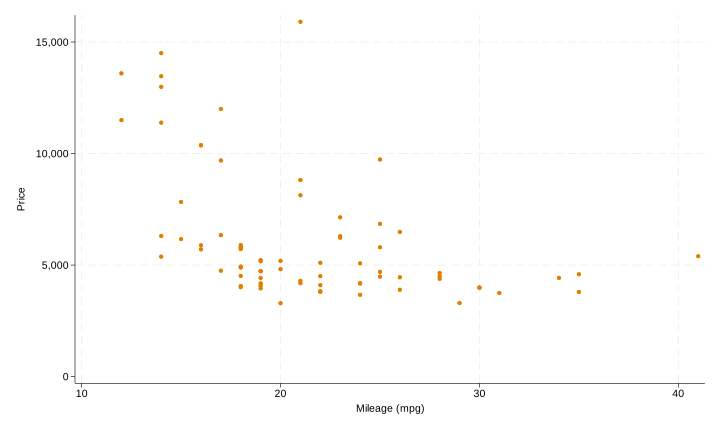
That’s what our data looks like. Clearly there seems to be an inverse relationship between miles per gallon and price.
Now we could fit a very simple linear model with miles per gallon being the predictor and price being the outcome and get some estimates of the relationship.
sysuse auto2
regress price mpg
#> (1978 automobile data)
#>
#>
#>       Source |       SS           df       MS      Number of obs   =        74
#> -------------+----------------------------------   F(1, 72)        =     20.26
#>        Model |   139449474         1   139449474   Prob > F        =    0.0000
#>     Residual |   495615923        72  6883554.48   R-squared       =    0.2196
#> -------------+----------------------------------   Adj R-squared   =    0.2087
#>        Total |   635065396        73  8699525.97   Root MSE        =    2623.7
#>
#> ------------------------------------------------------------------------------
#>        price | Coefficient  Std. err.      t    P>|t|     [95% conf. interval]
#> -------------+----------------------------------------------------------------
#>          mpg |  -238.8943   53.07669    -4.50   0.000    -344.7008   -133.0879
#>        _cons |   11253.06   1170.813     9.61   0.000     8919.088    13587.03
#> ------------------------------------------------------------------------------
That’s what our output looks like.
Our output also gives us 95% consonance (confidence) intervals by default. But suppose we wished to fit a fractional polynomial model and graph it and get the confidence bands, here’s what we would do.
sysuse auto2
mfp: glm price mpg
twoway (fpfitci price mpg, estcmd(glm) fcolor(dkorange%20) alcolor(%40))  || scatter price mpg, mcolor(dkorange) scale(0.75)
graph export "mfp.svg", replace
#> (1978 automobile data)
#>
#>
#> Deviance for model with all terms untransformed = 1373.079, 74 observations
#>
#> Variable     Model (vs.)   Deviance  Dev diff.   P      Powers   (vs.)
#> ----------------------------------------------------------------------
#> mpg          Lin.   FP2    1373.079    19.565  0.000+   1         -2 -2
#>              FP1           1356.927     3.413  0.182    -2
#>              Final         1356.927                     -2
#>
#>
#> Transformations of covariates:
#>
#> -> gen double Impg__1 = X^-2-.2204707671 if e(sample)
#>    (where: X = mpg/10)
#>
#> Final multivariable fractional polynomial model for price
#> --------------------------------------------------------------------
#>     Variable |    -----Initial-----          -----Final-----
#>              |   df     Select   Alpha    Status    df    Powers
#> -------------+------------------------------------------------------
#>          mpg |    4     1.0000   0.0500     in      2     -2
#> --------------------------------------------------------------------
#>
#> Generalized linear models                         Number of obs   =         74
#> Optimization     : ML                             Residual df     =         72
#>                                                   Scale parameter =    5533697
#> Deviance         =  398426217.4                   (1/df) Deviance =    5533697
#> Pearson          =  398426217.4                   (1/df) Pearson  =    5533697
#>
#> Variance function: V(u) = 1                       [Gaussian]
#> Link function    : g(u) = u                       [Identity]
#>
#>                                                   AIC             =    18.3909
#> Log likelihood   = -678.4632599                   BIC             =   3.98e+08
#>
#> ------------------------------------------------------------------------------
#>              |                 OIM
#>        price | Coefficient  std. err.      z    P>|z|     [95% conf. interval]
#> -------------+----------------------------------------------------------------
#>      Impg__1 |   13163.85   2013.016     6.54   0.000      9218.41    17109.29
#>        _cons |   5538.395   289.7737    19.11   0.000     4970.449    6106.341
#> ------------------------------------------------------------------------------
#> Deviance = 1356.927.
#>
#>
#> file mfp.svg saved as SVG format
That’s what our model looks graphed.
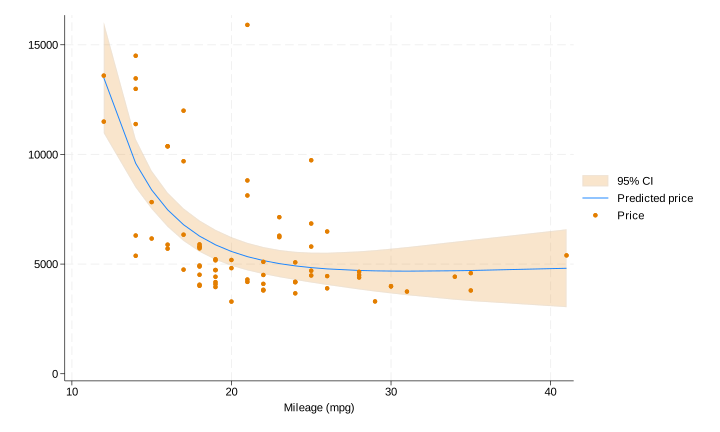
Now suppose we got a single estimate (point or interval) for a parameter, and we wanted all the intervals for it at every level.
Here’s the code that we’ll be using to achieve that in Stata.
#> no; dataset in memory has changed since last saved
#> r(4);
#>
#> r(4);
That’s a lot and may seem intimidating at first, but I’ll explain it line by line.
postfile topost level pvalue svalue lointerval upinterval using my_new_data, replace
#> no; dataset in memory has changed since last saved
#> r(4);“postfile” is the command that will be responsible for pasting the data from our overall loop into a new dataset. Here, we are telling Stata that the internal Stata memory used to hold these results (the post) will be named “topost” and that it will have five variables, “level”, “pvalue”, “svalue”, “lointerval”, and “upinterval.”
“level” will contain the consonance level that corresponds to the limits of the interval, with “lointerval” being the lower bound of the interval and “upinterval” being the upper bound.
“pvalue”is computed by taking 1 - “level”, which is alpha.
“svalue”is computed by taking the -log_{2} of the computed P-value, and this column will be used to plot the surprisal function.
“my_new_data” is the filename that we’ve assigned to our new dataset.
“replace” indicates that if there is an existing filename that already exists, we’re willing to relace it.
Here are the next few major lines
forvalues i = 10/99.9 {
      quietly regress price mpg, level(`i')
      matrix E = r(table)
      matrix list E
      post topost (`i') (1-`i'/100) ( ln(1-`i'/100)/ln(2) * -1) (E[5,1]) (E[6,1])
    }
#> no; dataset in memory has changed since last saved
#> r(4);
#>
#>
#>   6.         }
#>
#> E[9,2]
#>                mpg       _cons
#>      b  -238.89435   11253.061
#>     se   53.076687   1170.8128
#>      t   -4.500928   9.6113239
#> pvalue   .00002546   1.535e-14
#>     ll   -245.5876   11105.415
#>     ul  -232.20109   11400.706
#>     df          72          72
#>   crit   .12610537   .12610537
#>  eform           0           0
#> post topost not found
#> r(111);
#>
#> r(111);
The command “forvalues” is responsible for taking a set of numbers that we provide it, and running the contents within the braces through those numbers. So here, we’ve set the local macro “i” to contain numbers between 10 and 99.99 for our consonance levels. Why 10? Stata cannot compute consonance intervals lower than 10%.
Our next line contains the actual contents of what we want to do. Here, it says that we will run a simple linear regression where mpg is the predictor and where price is the outcome, and that the outputs for each loop will be suppressed, hence the “quiet.”
Then, we have the command “level” with the local macro “i” inside of it. As you may already know, “level” dictates the consonance level that Stata provides us. By default, this is set to 95%, but here, we’ve set it “i”, which we established via “forvalues” as being set to numbers between 10 and 99.
The next line two lines
      matrix E = r(table)
      matrix list E
#> no; dataset in memory has changed since last saved
#> r(4);
#>
#>
#>
#>
#> symmetric E[1,1]
#>     c1
#> r1   .
indicate that we will take variables of a certain class r(), (this class contains the interval bounds we need) and place them within a matrix called E. Then we will list the contents of this matrix.
post topost (`i') (1-`i'/100) ( ln(1-`i'/100)/ln(2) * -1) (E[5,1]) (E[6,1])
#> no; dataset in memory has changed since last saved
#> r(4);
#>
#>
#> post topost not found
#> r(111);
#>
#> r(111);
From the contents of this matrix list, we will take the estimates from the fifth and sixth rows (look at the last two paranthesis of this line of code above and then the image below) in the first column which contain our consonance limits, with the fifth row containing the lower bound of the interval and the sixth containing the upper bound.

We will place the contents from the fifth row into the second variable we set originally for our new dataset, which was “lointerval.” The contents of the sixth row will be placed into “upinterval.”
All potential values of “i” (10-99) will be placed into the first variable that we set, “level”. From this first variable, we can compute the second variable we set up, which was “Pvalue” and we’ve done that here by subtracting “level” from 1 and then dividing the whole equation by 100, so that our P-value can be on the proper scale. Our third variable, which is the longest, computes the “Svalue” by using the previous variable, the “Pvalue” and taking the -log_{2} of it.
The relationships between the variables on this line and the variables we set up in the very first line are dictated by the order of the commands we have set, and therefore they correspond to the same order.
“post topost” is writing the results from each loop as new observations in this data structure.
With that, our loop has concluded, and we can now tell Stata that “post” is no longer needed
postclose topost
#> no; dataset in memory has changed since last saved
#> r(4);
#>
#>
#> post topost not found
#> r(111);
#>
#> r(111);
We then tell Stata to clear its memory to make room for the new dataset we just created and we can list the contents of this new dataset.
use my_new_data, clear
list
#> no; dataset in memory has changed since last saved
#> r(4);
Now we have an actual dataset with all the consonance intervals at all the levels we wanted, ranging from 10% all the way up to 99%.
In order to get a function, we’ll need to be able to graph these results, and that can be tricky since for each observation we have one y value (the consonance level), and two x values, the lower bound of the interval and the upper bound of the interval.
So a typical scatterplot will not work, since Stata will only accept one x value. To bypass this, we’ll have to use a paired-coordinate scatterplot which will allow us to plot two different y variables and two different x variables.
Of course, we don’t need two y variables, so we can set both options to the variable “level”, and then we can set our first x variable to “lointerval” and the second x variable to “upinterval.”
This can all be done with the following commands, which will also allow us to set the title and subtitle of the graph, along with the titles of the axes.
twoway (pcscatter level lointerval level upinterval), ///
ytitle(Consonance Level (%)) xtitle(Consonance Limits) ///
title(Consonance Curve) ///
subtitle(A function comprised of several consonance intervals at various levels.)
#> no; dataset in memory has changed since last saved
#> r(4);
#>
#>
#> variable level not found
#> r(111);
#>
#> r(111);
However, I would recommend using the menu to customize the plots as much as possible. Simply go to the Graphics menu and select Twoway Graphs. Then create a new plot definition, and select the Advanced plots and choose a paired coordinate scatterplot and fill in the y variables, both of which will be “levels” and the x variables, which will be “lointerval” and “upinterval”.
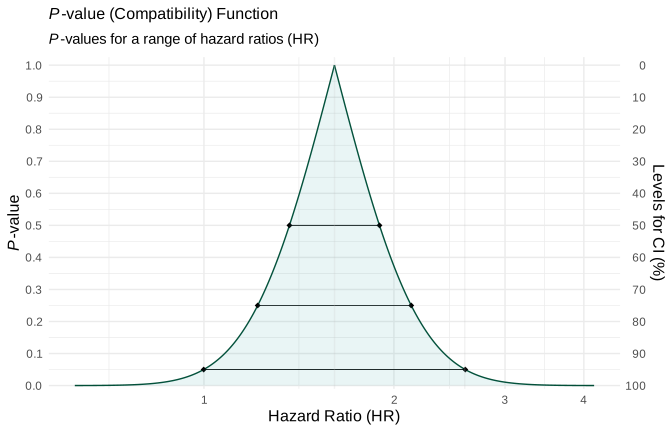
So now, here’s what our confidence/consonance function looks like.
clear
sysuse auto2
postfile topost level pvalue svalue lointerval upinterval using my_new_data, replace
forvalues i = 10/99.9 {
quietly regress price weight, level(`i')
matrix E = r(table)
matrix list E
post topost (`i') (1-`i'/100) ( ln(1-`i'/100)/ln(2) * -1) (E[5,1]) (E[6,1])
}
postclose topost
use my_new_data, clear
twoway (pcscatter pvalue lointerval pvalue upinterval, mcolor(maroon)), ytitle(Consonance Level (%)) xtitle(Consonance Limits) scale(0.75) ///
title(Consonance Curve) subtitle(A function comprised of several consonance intervals at various levels.)
graph export "confidence.svg", replace
#> no; dataset in memory has changed since last saved
#> r(4);
#>
#>
#>
#> (1978 automobile data)
#>
#>
#> 6. }
#>
#> E[9,2]
#> weight _cons
#> b 2.0440626 -6.7073534
#> se .37683413 1174.4296
#> t 5.4243032 -.00571116
#> pvalue 7.416e-07 .99545897
#> ll 1.9965418 -154.80923
#> ul 2.0915834 141.39452
#> df 72 72
#> crit .12610537 .12610537
#> eform 0 0
#>
#> E[9,2]
#> weight _cons
#> b 2.0440626 -6.7073534
#> se .37683413 1174.4296
#> t 5.4243032 -.00571116
#> pvalue 7.416e-07 .99545897
#> ll 1.9917601 -169.71175
#> ul 2.0963651 156.29704
#> df 72 72
#> crit .13879452 .13879452
#> eform 0 0
#>
#> E[9,2]
#> weight _cons
#> b 2.0440626 -6.7073534
#> se .37683413 1174.4296
#> t 5.4243032 -.00571116
#> pvalue 7.416e-07 .99545897
#> ll 1.9869698 -184.64092
#> ul 2.1011554 171.22621
#> df 72 72
#> crit .15150637 .15150637
#> eform 0 0
#>
#> E[9,2]
#> weight _cons
#> b 2.0440626 -6.7073534
#> se .37683413 1174.4296
#> t 5.4243032 -.00571116
#> pvalue 7.416e-07 .99545897
#> ll 1.9821702 -199.59928
#> ul 2.105955 186.18458
#> df 72 72
#> crit .16424308 .16424308
#> eform 0 0
#>
#> E[9,2]
#> weight _cons
#> b 2.0440626 -6.7073534
#> se .37683413 1174.4296
#> t 5.4243032 -.00571116
#> pvalue 7.416e-07 .99545897
#> ll 1.9773604 -214.58944
#> ul 2.1107648 201.17473
#> df 72 72
#> crit .17700685 .17700685
#> eform 0 0
#>
#> E[9,2]
#> weight _cons
#> b 2.0440626 -6.7073534
#> se .37683413 1174.4296
#> t 5.4243032 -.00571116
#> pvalue 7.416e-07 .99545897
#> ll 1.9725395 -229.61399
#> ul 2.1155857 216.19928
#> df 72 72
#> crit .18979991 .18979991
#> eform 0 0
#>
#> E[9,2]
#> weight _cons
#> b 2.0440626 -6.7073534
#> se .37683413 1174.4296
#> t 5.4243032 -.00571116
#> pvalue 7.416e-07 .99545897
#> ll 1.9677067 -244.67561
#> ul 2.1204184 231.2609
#> df 72 72
#> crit .20262454 .20262454
#> eform 0 0
#>
#> E[9,2]
#> weight _cons
#> b 2.0440626 -6.7073534
#> se .37683413 1174.4296
#> t 5.4243032 -.00571116
#> pvalue 7.416e-07 .99545897
#> ll 1.9628612 -259.77699
#> ul 2.1252639 246.36228
#> df 72 72
#> crit .21548302 .21548302
#> eform 0 0
#>
#> E[9,2]
#> weight _cons
#> b 2.0440626 -6.7073534
#> se .37683413 1174.4296
#> t 5.4243032 -.00571116
#> pvalue 7.416e-07 .99545897
#> ll 1.9580021 -274.92089
#> ul 2.1301231 261.50618
#> df 72 72
#> crit .22837771 .22837771
#> eform 0 0
#>
#> E[9,2]
#> weight _cons
#> b 2.0440626 -6.7073534
#> se .37683413 1174.4296
#> t 5.4243032 -.00571116
#> pvalue 7.416e-07 .99545897
#> ll 1.9531284 -290.11011
#> ul 2.1349968 276.6954
#> df 72 72
#> crit .24131098 .24131098
#> eform 0 0
#>
#> E[9,2]
#> weight _cons
#> b 2.0440626 -6.7073534
#> se .37683413 1174.4296
#> t 5.4243032 -.00571116
#> pvalue 7.416e-07 .99545897
#> ll 1.9482392 -305.34751
#> ul 2.139886 291.9328
#> df 72 72
#> crit .25428528 .25428528
#> eform 0 0
#>
#> E[9,2]
#> weight _cons
#> b 2.0440626 -6.7073534
#> se .37683413 1174.4296
#> t 5.4243032 -.00571116
#> pvalue 7.416e-07 .99545897
#> ll 1.9433337 -320.63601
#> ul 2.1447915 307.2213
#> df 72 72
#> crit .26730308 .26730308
#> eform 0 0
#>
#> E[9,2]
#> weight _cons
#> b 2.0440626 -6.7073534
#> se .37683413 1174.4296
#> t 5.4243032 -.00571116
#> pvalue 7.416e-07 .99545897
#> ll 1.9384108 -335.97858
#> ul 2.1497144 322.56387
#> df 72 72
#> crit .28036693 .28036693
#> eform 0 0
#>
#> E[9,2]
#> weight _cons
#> b 2.0440626 -6.7073534
#> se .37683413 1174.4296
#> t 5.4243032 -.00571116
#> pvalue 7.416e-07 .99545897
#> ll 1.9334695 -351.37828
#> ul 2.1546557 337.96357
#> df 72 72
#> crit .29347943 .29347943
#> eform 0 0
#>
#> E[9,2]
#> weight _cons
#> b 2.0440626 -6.7073534
#> se .37683413 1174.4296
#> t 5.4243032 -.00571116
#> pvalue 7.416e-07 .99545897
#> ll 1.928509 -366.83823
#> ul 2.1596162 353.42352
#> df 72 72
#> crit .30664322 .30664322
#> eform 0 0
#>
#> E[9,2]
#> weight _cons
#> b 2.0440626 -6.7073534
#> se .37683413 1174.4296
#> t 5.4243032 -.00571116
#> pvalue 7.416e-07 .99545897
#> ll 1.923528 -382.36163
#> ul 2.1645971 368.94693
#> df 72 72
#> crit .31986105 .31986105
#> eform 0 0
#>
#> E[9,2]
#> weight _cons
#> b 2.0440626 -6.7073534
#> se .37683413 1174.4296
#> t 5.4243032 -.00571116
#> pvalue 7.416e-07 .99545897
#> ll 1.9185257 -397.95177
#> ul 2.1695995 384.53707
#> df 72 72
#> crit .3331357 .3331357
#> eform 0 0
#>
#> E[9,2]
#> weight _cons
#> b 2.0440626 -6.7073534
#> se .37683413 1174.4296
#> t 5.4243032 -.00571116
#> pvalue 7.416e-07 .99545897
#> ll 1.9135008 -413.61202
#> ul 2.1746243 400.19732
#> df 72 72
#> crit .34647004 .34647004
#> eform 0 0
#>
#> E[9,2]
#> weight _cons
#> b 2.0440626 -6.7073534
#> se .37683413 1174.4296
#> t 5.4243032 -.00571116
#> pvalue 7.416e-07 .99545897
#> ll 1.9084524 -429.34585
#> ul 2.1796728 415.93115
#> df 72 72
#> crit .35986704 .35986704
#> eform 0 0
#>
#> E[9,2]
#> weight _cons
#> b 2.0440626 -6.7073534
#> se .37683413 1174.4296
#> t 5.4243032 -.00571116
#> pvalue 7.416e-07 .99545897
#> ll 1.9033792 -445.15684
#> ul 2.184746 431.74213
#> df 72 72
#> crit .37332973 .37332973
#> eform 0 0
#>
#> E[9,2]
#> weight _cons
#> b 2.0440626 -6.7073534
#> se .37683413 1174.4296
#> t 5.4243032 -.00571116
#> pvalue 7.416e-07 .99545897
#> ll 1.8982801 -461.04865
#> ul 2.1898451 447.63394
#> df 72 72
#> crit .38686124 .38686124
#> eform 0 0
#>
#> E[9,2]
#> weight _cons
#> b 2.0440626 -6.7073534
#> se .37683413 1174.4296
#> t 5.4243032 -.00571116
#> pvalue 7.416e-07 .99545897
#> ll 1.8931538 -477.02508
#> ul 2.1949714 463.61037
#> df 72 72
#> crit .40046481 .40046481
#> eform 0 0
#>
#> E[9,2]
#> weight _cons
#> b 2.0440626 -6.7073534
#> se .37683413 1174.4296
#> t 5.4243032 -.00571116
#> pvalue 7.416e-07 .99545897
#> ll 1.8879991 -493.09005
#> ul 2.2001261 479.67535
#> df 72 72
#> crit .41414377 .41414377
#> eform 0 0
#>
#> E[9,2]
#> weight _cons
#> b 2.0440626 -6.7073534
#> se .37683413 1174.4296
#> t 5.4243032 -.00571116
#> pvalue 7.416e-07 .99545897
#> ll 1.8828147 -509.24762
#> ul 2.2053105 495.83291
#> df 72 72
#> crit .42790157 .42790157
#> eform 0 0
#>
#> E[9,2]
#> weight _cons
#> b 2.0440626 -6.7073534
#> se .37683413 1174.4296
#> t 5.4243032 -.00571116
#> pvalue 7.416e-07 .99545897
#> ll 1.8775992 -525.50196
#> ul 2.210526 512.08725
#> df 72 72
#> crit .44174177 .44174177
#> eform 0 0
#>
#> E[9,2]
#> weight _cons
#> b 2.0440626 -6.7073534
#> se .37683413 1174.4296
#> t 5.4243032 -.00571116
#> pvalue 7.416e-07 .99545897
#> ll 1.8723513 -541.85741
#> ul 2.2157739 528.4427
#> df 72 72
#> crit .45566806 .45566806
#> eform 0 0
#>
#> E[9,2]
#> weight _cons
#> b 2.0440626 -6.7073534
#> se .37683413 1174.4296
#> t 5.4243032 -.00571116
#> pvalue 7.416e-07 .99545897
#> ll 1.8670695 -558.31847
#> ul 2.2210557 544.90376
#> df 72 72
#> crit .46968428 .46968428
#> eform 0 0
#>
#> E[9,2]
#> weight _cons
#> b 2.0440626 -6.7073534
#> se .37683413 1174.4296
#> t 5.4243032 -.00571116
#> pvalue 7.416e-07 .99545897
#> ll 1.8617523 -574.88981
#> ul 2.2263728 561.4751
#> df 72 72
#> crit .4837944 .4837944
#> eform 0 0
#>
#> E[9,2]
#> weight _cons
#> b 2.0440626 -6.7073534
#> se .37683413 1174.4296
#> t 5.4243032 -.00571116
#> pvalue 7.416e-07 .99545897
#> ll 1.8563982 -591.57627
#> ul 2.2317269 578.16156
#> df 72 72
#> crit .49800254 .49800254
#> eform 0 0
#>
#> E[9,2]
#> weight _cons
#> b 2.0440626 -6.7073534
#> se .37683413 1174.4296
#> t 5.4243032 -.00571116
#> pvalue 7.416e-07 .99545897
#> ll 1.8510056 -608.38289
#> ul 2.2371196 594.96819
#> df 72 72
#> crit .51231299 .51231299
#> eform 0 0
#>
#> E[9,2]
#> weight _cons
#> b 2.0440626 -6.7073534
#> se .37683413 1174.4296
#> t 5.4243032 -.00571116
#> pvalue 7.416e-07 .99545897
#> ll 1.8455727 -625.31493
#> ul 2.2425525 611.90022
#> df 72 72
#> crit .52673023 .52673023
#> eform 0 0
#>
#> E[9,2]
#> weight _cons
#> b 2.0440626 -6.7073534
#> se .37683413 1174.4296
#> t 5.4243032 -.00571116
#> pvalue 7.416e-07 .99545897
#> ll 1.8400978 -642.37784
#> ul 2.2480274 628.96313
#> df 72 72
#> crit .54125891 .54125891
#> eform 0 0
#>
#> E[9,2]
#> weight _cons
#> b 2.0440626 -6.7073534
#> se .37683413 1174.4296
#> t 5.4243032 -.00571116
#> pvalue 7.416e-07 .99545897
#> ll 1.834579 -659.57733
#> ul 2.2535461 646.16263
#> df 72 72
#> crit .55590389 .55590389
#> eform 0 0
#>
#> E[9,2]
#> weight _cons
#> b 2.0440626 -6.7073534
#> se .37683413 1174.4296
#> t 5.4243032 -.00571116
#> pvalue 7.416e-07 .99545897
#> ll 1.8290146 -676.91937
#> ul 2.2591106 663.50467
#> df 72 72
#> crit .57067024 .57067024
#> eform 0 0
#>
#> E[9,2]
#> weight _cons
#> b 2.0440626 -6.7073534
#> se .37683413 1174.4296
#> t 5.4243032 -.00571116
#> pvalue 7.416e-07 .99545897
#> ll 1.8234024 -694.41018
#> ul 2.2647228 680.99548
#> df 72 72
#> crit .58556327 .58556327
#> eform 0 0
#>
#> E[9,2]
#> weight _cons
#> b 2.0440626 -6.7073534
#> se .37683413 1174.4296
#> t 5.4243032 -.00571116
#> pvalue 7.416e-07 .99545897
#> ll 1.8177403 -712.05629
#> ul 2.2703848 698.64158
#> df 72 72
#> crit .60058852 .60058852
#> eform 0 0
#>
#> E[9,2]
#> weight _cons
#> b 2.0440626 -6.7073534
#> se .37683413 1174.4296
#> t 5.4243032 -.00571116
#> pvalue 7.416e-07 .99545897
#> ll 1.8120263 -729.86453
#> ul 2.2760989 716.44982
#> df 72 72
#> crit .61575183 .61575183
#> eform 0 0
#>
#> E[9,2]
#> weight _cons
#> b 2.0440626 -6.7073534
#> se .37683413 1174.4296
#> t 5.4243032 -.00571116
#> pvalue 7.416e-07 .99545897
#> ll 1.8062579 -747.84207
#> ul 2.2818673 734.42736
#> df 72 72
#> crit .6310593 .6310593
#> eform 0 0
#>
#> E[9,2]
#> weight _cons
#> b 2.0440626 -6.7073534
#> se .37683413 1174.4296
#> t 5.4243032 -.00571116
#> pvalue 7.416e-07 .99545897
#> ll 1.8004328 -765.99645
#> ul 2.2876924 752.58174
#> df 72 72
#> crit .64651734 .64651734
#> eform 0 0
#>
#> E[9,2]
#> weight _cons
#> b 2.0440626 -6.7073534
#> se .37683413 1174.4296
#> t 5.4243032 -.00571116
#> pvalue 7.416e-07 .99545897
#> ll 1.7945484 -784.3356
#> ul 2.2935768 770.92089
#> df 72 72
#> crit .6621327 .6621327
#> eform 0 0
#>
#> E[9,2]
#> weight _cons
#> b 2.0440626 -6.7073534
#> se .37683413 1174.4296
#> t 5.4243032 -.00571116
#> pvalue 7.416e-07 .99545897
#> ll 1.788602 -802.86785
#> ul 2.2995232 789.45315
#> df 72 72
#> crit .6779125 .6779125
#> eform 0 0
#>
#> E[9,2]
#> weight _cons
#> b 2.0440626 -6.7073534
#> se .37683413 1174.4296
#> t 5.4243032 -.00571116
#> pvalue 7.416e-07 .99545897
#> ll 1.7825909 -821.60203
#> ul 2.3055343 808.18732
#> df 72 72
#> crit .69386422 .69386422
#> eform 0 0
#>
#> E[9,2]
#> weight _cons
#> b 2.0440626 -6.7073534
#> se .37683413 1174.4296
#> t 5.4243032 -.00571116
#> pvalue 7.416e-07 .99545897
#> ll 1.7765119 -840.54741
#> ul 2.3116132 827.1327
#> df 72 72
#> crit .70999578 .70999578
#> eform 0 0
#>
#> E[9,2]
#> weight _cons
#> b 2.0440626 -6.7073534
#> se .37683413 1174.4296
#> t 5.4243032 -.00571116
#> pvalue 7.416e-07 .99545897
#> ll 1.7703621 -859.71383
#> ul 2.3177631 846.29912
#> df 72 72
#> crit .72631555 .72631555
#> eform 0 0
#>
#> E[9,2]
#> weight _cons
#> b 2.0440626 -6.7073534
#> se .37683413 1174.4296
#> t 5.4243032 -.00571116
#> pvalue 7.416e-07 .99545897
#> ll 1.764138 -879.11169
#> ul 2.3239872 865.69698
#> df 72 72
#> crit .74283238 .74283238
#> eform 0 0
#>
#> E[9,2]
#> weight _cons
#> b 2.0440626 -6.7073534
#> se .37683413 1174.4296
#> t 5.4243032 -.00571116
#> pvalue 7.416e-07 .99545897
#> ll 1.7578361 -898.75203
#> ul 2.3302891 885.33733
#> df 72 72
#> crit .75955569 .75955569
#> eform 0 0
#>
#> E[9,2]
#> weight _cons
#> b 2.0440626 -6.7073534
#> se .37683413 1174.4296
#> t 5.4243032 -.00571116
#> pvalue 7.416e-07 .99545897
#> ll 1.7514526 -918.64658
#> ul 2.3366726 905.23187
#> df 72 72
#> crit .77649544 .77649544
#> eform 0 0
#>
#> E[9,2]
#> weight _cons
#> b 2.0440626 -6.7073534
#> se .37683413 1174.4296
#> t 5.4243032 -.00571116
#> pvalue 7.416e-07 .99545897
#> ll 1.7449836 -938.80778
#> ul 2.3431416 925.39308
#> df 72 72
#> crit .79366225 .79366225
#> eform 0 0
#>
#> E[9,2]
#> weight _cons
#> b 2.0440626 -6.7073534
#> se .37683413 1174.4296
#> t 5.4243032 -.00571116
#> pvalue 7.416e-07 .99545897
#> ll 1.7384247 -959.24894
#> ul 2.3497005 945.83423
#> df 72 72
#> crit .81106743 .81106743
#> eform 0 0
#>
#> E[9,2]
#> weight _cons
#> b 2.0440626 -6.7073534
#> se .37683413 1174.4296
#> t 5.4243032 -.00571116
#> pvalue 7.416e-07 .99545897
#> ll 1.7317715 -979.98422
#> ul 2.3563537 966.56951
#> df 72 72
#> crit .82872304 .82872304
#> eform 0 0
#>
#> E[9,2]
#> weight _cons
#> b 2.0440626 -6.7073534
#> se .37683413 1174.4296
#> t 5.4243032 -.00571116
#> pvalue 7.416e-07 .99545897
#> ll 1.725019 -1001.0288
#> ul 2.3631062 987.61406
#> df 72 72
#> crit .846642 .846642
#> eform 0 0
#>
#> E[9,2]
#> weight _cons
#> b 2.0440626 -6.7073534
#> se .37683413 1174.4296
#> t 5.4243032 -.00571116
#> pvalue 7.416e-07 .99545897
#> ll 1.7181621 -1022.3988
#> ul 2.3699631 1008.9841
#> df 72 72
#> crit .8648381 .8648381
#> eform 0 0
#>
#> E[9,2]
#> weight _cons
#> b 2.0440626 -6.7073534
#> se .37683413 1174.4296
#> t 5.4243032 -.00571116
#> pvalue 7.416e-07 .99545897
#> ll 1.7111951 -1044.1118
#> ul 2.37693 1030.6971
#> df 72 72
#> crit .88332619 .88332619
#> eform 0 0
#>
#> E[9,2]
#> weight _cons
#> b 2.0440626 -6.7073534
#> se .37683413 1174.4296
#> t 5.4243032 -.00571116
#> pvalue 7.416e-07 .99545897
#> ll 1.7041122 -1066.1864
#> ul 2.384013 1052.7716
#> df 72 72
#> crit .90212219 .90212219
#> eform 0 0
#>
#> E[9,2]
#> weight _cons
#> b 2.0440626 -6.7073534
#> se .37683413 1174.4296
#> t 5.4243032 -.00571116
#> pvalue 7.416e-07 .99545897
#> ll 1.6969067 -1088.6427
#> ul 2.3912185 1075.228
#> df 72 72
#> crit .92124328 .92124328
#> eform 0 0
#>
#> E[9,2]
#> weight _cons
#> b 2.0440626 -6.7073534
#> se .37683413 1174.4296
#> t 5.4243032 -.00571116
#> pvalue 7.416e-07 .99545897
#> ll 1.6895717 -1111.5027
#> ul 2.3985535 1098.088
#> df 72 72
#> crit .940708 .940708
#> eform 0 0
#>
#> E[9,2]
#> weight _cons
#> b 2.0440626 -6.7073534
#> se .37683413 1174.4296
#> t 5.4243032 -.00571116
#> pvalue 7.416e-07 .99545897
#> ll 1.6820997 -1134.7897
#> ul 2.4060255 1121.375
#> df 72 72
#> crit .9605364 .9605364
#> eform 0 0
#>
#> E[9,2]
#> weight _cons
#> b 2.0440626 -6.7073534
#> se .37683413 1174.4296
#> t 5.4243032 -.00571116
#> pvalue 7.416e-07 .99545897
#> ll 1.6744824 -1158.5295
#> ul 2.4136428 1145.1148
#> df 72 72
#> crit .98075025 .98075025
#> eform 0 0
#>
#> E[9,2]
#> weight _cons
#> b 2.0440626 -6.7073534
#> se .37683413 1174.4296
#> t 5.4243032 -.00571116
#> pvalue 7.416e-07 .99545897
#> ll 1.666711 -1182.7497
#> ul 2.4214142 1169.335
#> df 72 72
#> crit 1.0013732 1.0013732
#> eform 0 0
#>
#> E[9,2]
#> weight _cons
#> b 2.0440626 -6.7073534
#> se .37683413 1174.4296
#> t 5.4243032 -.00571116
#> pvalue 7.416e-07 .99545897
#> ll 1.6587757 -1207.4807
#> ul 2.4293495 1194.066
#> df 72 72
#> crit 1.0224311 1.0224311
#> eform 0 0
#>
#> E[9,2]
#> weight _cons
#> b 2.0440626 -6.7073534
#> se .37683413 1174.4296
#> t 5.4243032 -.00571116
#> pvalue 7.416e-07 .99545897
#> ll 1.6506658 -1232.7556
#> ul 2.4374594 1219.3409
#> df 72 72
#> crit 1.0439521 1.0439521
#> eform 0 0
#>
#> E[9,2]
#> weight _cons
#> b 2.0440626 -6.7073534
#> se .37683413 1174.4296
#> t 5.4243032 -.00571116
#> pvalue 7.416e-07 .99545897
#> ll 1.6423698 -1258.6108
#> ul 2.4457554 1245.1961
#> df 72 72
#> crit 1.0659672 1.0659672
#> eform 0 0
#>
#> E[9,2]
#> weight _cons
#> b 2.0440626 -6.7073534
#> se .37683413 1174.4296
#> t 5.4243032 -.00571116
#> pvalue 7.416e-07 .99545897
#> ll 1.6338747 -1285.0862
#> ul 2.4542505 1271.6715
#> df 72 72
#> crit 1.0885104 1.0885104
#> eform 0 0
#>
#> E[9,2]
#> weight _cons
#> b 2.0440626 -6.7073534
#> se .37683413 1174.4296
#> t 5.4243032 -.00571116
#> pvalue 7.416e-07 .99545897
#> ll 1.6251665 -1312.226
#> ul 2.4629587 1298.8113
#> df 72 72
#> crit 1.1116194 1.1116194
#> eform 0 0
#>
#> E[9,2]
#> weight _cons
#> b 2.0440626 -6.7073534
#> se .37683413 1174.4296
#> t 5.4243032 -.00571116
#> pvalue 7.416e-07 .99545897
#> ll 1.6162293 -1340.0792
#> ul 2.4718958 1326.6645
#> df 72 72
#> crit 1.1353357 1.1353357
#> eform 0 0
#>
#> E[9,2]
#> weight _cons
#> b 2.0440626 -6.7073534
#> se .37683413 1174.4296
#> t 5.4243032 -.00571116
#> pvalue 7.416e-07 .99545897
#> ll 1.6070459 -1368.7001
#> ul 2.4810793 1355.2854
#> df 72 72
#> crit 1.1597058 1.1597058
#> eform 0 0
#>
#> E[9,2]
#> weight _cons
#> b 2.0440626 -6.7073534
#> se .37683413 1174.4296
#> t 5.4243032 -.00571116
#> pvalue 7.416e-07 .99545897
#> ll 1.5975965 -1398.1496
#> ul 2.4905286 1384.7349
#> df 72 72
#> crit 1.1847813 1.1847813
#> eform 0 0
#>
#> E[9,2]
#> weight _cons
#> b 2.0440626 -6.7073534
#> se .37683413 1174.4296
#> t 5.4243032 -.00571116
#> pvalue 7.416e-07 .99545897
#> ll 1.5878595 -1428.4959
#> ul 2.5002657 1415.0812
#> df 72 72
#> crit 1.2106205 1.2106205
#> eform 0 0
#>
#> E[9,2]
#> weight _cons
#> b 2.0440626 -6.7073534
#> se .37683413 1174.4296
#> t 5.4243032 -.00571116
#> pvalue 7.416e-07 .99545897
#> ll 1.5778099 -1459.816
#> ul 2.5103152 1446.4013
#> df 72 72
#> crit 1.2372888 1.2372888
#> eform 0 0
#>
#> E[9,2]
#> weight _cons
#> b 2.0440626 -6.7073534
#> se .37683413 1174.4296
#> t 5.4243032 -.00571116
#> pvalue 7.416e-07 .99545897
#> ll 1.5674199 -1492.1971
#> ul 2.5207052 1478.7823
#> df 72 72
#> crit 1.2648606 1.2648606
#> eform 0 0
#>
#> E[9,2]
#> weight _cons
#> b 2.0440626 -6.7073534
#> se .37683413 1174.4296
#> t 5.4243032 -.00571116
#> pvalue 7.416e-07 .99545897
#> ll 1.5566576 -1525.7387
#> ul 2.5314676 1512.324
#> df 72 72
#> crit 1.2934205 1.2934205
#> eform 0 0
#>
#> E[9,2]
#> weight _cons
#> b 2.0440626 -6.7073534
#> se .37683413 1174.4296
#> t 5.4243032 -.00571116
#> pvalue 7.416e-07 .99545897
#> ll 1.5454862 -1560.5551
#> ul 2.542639 1547.1404
#> df 72 72
#> crit 1.3230659 1.3230659
#> eform 0 0
#>
#> E[9,2]
#> weight _cons
#> b 2.0440626 -6.7073534
#> se .37683413 1174.4296
#> t 5.4243032 -.00571116
#> pvalue 7.416e-07 .99545897
#> ll 1.5338634 -1596.7782
#> ul 2.5542617 1583.3635
#> df 72 72
#> crit 1.3539091 1.3539091
#> eform 0 0
#>
#> E[9,2]
#> weight _cons
#> b 2.0440626 -6.7073534
#> se .37683413 1174.4296
#> t 5.4243032 -.00571116
#> pvalue 7.416e-07 .99545897
#> ll 1.5217399 -1634.562
#> ul 2.5663853 1621.1473
#> df 72 72
#> crit 1.3860811 1.3860811
#> eform 0 0
#>
#> E[9,2]
#> weight _cons
#> b 2.0440626 -6.7073534
#> se .37683413 1174.4296
#> t 5.4243032 -.00571116
#> pvalue 7.416e-07 .99545897
#> ll 1.5090577 -1674.0871
#> ul 2.5790675 1660.6724
#> df 72 72
#> crit 1.4197358 1.4197358
#> eform 0 0
#>
#> E[9,2]
#> weight _cons
#> b 2.0440626 -6.7073534
#> se .37683413 1174.4296
#> t 5.4243032 -.00571116
#> pvalue 7.416e-07 .99545897
#> ll 1.4957479 -1715.5678
#> ul 2.5923772 1702.1531
#> df 72 72
#> crit 1.4550557 1.4550557
#> eform 0 0
#>
#> E[9,2]
#> weight _cons
#> b 2.0440626 -6.7073534
#> se .37683413 1174.4296
#> t 5.4243032 -.00571116
#> pvalue 7.416e-07 .99545897
#> ll 1.4817282 -1759.2614
#> ul 2.606397 1745.8467
#> df 72 72
#> crit 1.4922598 1.4922598
#> eform 0 0
#>
#> E[9,2]
#> weight _cons
#> b 2.0440626 -6.7073534
#> se .37683413 1174.4296
#> t 5.4243032 -.00571116
#> pvalue 7.416e-07 .99545897
#> ll 1.4668982 -1805.4801
#> ul 2.621227 1792.0654
#> df 72 72
#> crit 1.5316139 1.5316139
#> eform 0 0
#>
#> E[9,2]
#> weight _cons
#> b 2.0440626 -6.7073534
#> se .37683413 1174.4296
#> t 5.4243032 -.00571116
#> pvalue 7.416e-07 .99545897
#> ll 1.4511346 -1854.6083
#> ul 2.6369906 1841.1936
#> df 72 72
#> crit 1.5734455 1.5734455
#> eform 0 0
#>
#> E[9,2]
#> weight _cons
#> b 2.0440626 -6.7073534
#> se .37683413 1174.4296
#> t 5.4243032 -.00571116
#> pvalue 7.416e-07 .99545897
#> ll 1.434283 -1907.1275
#> ul 2.6538422 1893.7128
#> df 72 72
#> crit 1.6181644 1.6181644
#> eform 0 0
#>
#> E[9,2]
#> weight _cons
#> b 2.0440626 -6.7073534
#> se .37683413 1174.4296
#> t 5.4243032 -.00571116
#> pvalue 7.416e-07 .99545897
#> ll 1.4161462 -1963.652
#> ul 2.6719789 1950.2373
#> df 72 72
#> crit 1.6662937 1.6662937
#> eform 0 0
#>
#> E[9,2]
#> weight _cons
#> b 2.0440626 -6.7073534
#> se .37683413 1174.4296
#> t 5.4243032 -.00571116
#> pvalue 7.416e-07 .99545897
#> ll 1.3964671 -2024.9835
#> ul 2.6916581 2011.5688
#> df 72 72
#> crit 1.7185161 1.7185161
#> eform 0 0
#>
#> E[9,2]
#> weight _cons
#> b 2.0440626 -6.7073534
#> se .37683413 1174.4296
#> t 5.4243032 -.00571116
#> pvalue 7.416e-07 .99545897
#> ll 1.3749003 -2092.198
#> ul 2.7132249 2078.7833
#> df 72 72
#> crit 1.7757477 1.7757477
#> eform 0 0
#>
#> E[9,2]
#> weight _cons
#> b 2.0440626 -6.7073534
#> se .37683413 1174.4296
#> t 5.4243032 -.00571116
#> pvalue 7.416e-07 .99545897
#> ll 1.3509668 -2166.7882
#> ul 2.7371584 2153.3735
#> df 72 72
#> crit 1.8392595 1.8392595
#> eform 0 0
#>
#> E[9,2]
#> weight _cons
#> b 2.0440626 -6.7073534
#> se .37683413 1174.4296
#> t 5.4243032 -.00571116
#> pvalue 7.416e-07 .99545897
#> ll 1.3239731 -2250.9159
#> ul 2.764152 2237.5012
#> df 72 72
#> crit 1.9108923 1.9108923
#> eform 0 0
#>
#> E[9,2]
#> weight _cons
#> b 2.0440626 -6.7073534
#> se .37683413 1174.4296
#> t 5.4243032 -.00571116
#> pvalue 7.416e-07 .99545897
#> ll 1.2928575 -2347.89
#> ul 2.7952677 2334.4753
#> df 72 72
#> crit 1.9934636 1.9934636
#> eform 0 0
#>
#> E[9,2]
#> weight _cons
#> b 2.0440626 -6.7073534
#> se .37683413 1174.4296
#> t 5.4243032 -.00571116
#> pvalue 7.416e-07 .99545897
#> ll 1.2558669 -2463.1736
#> ul 2.8322583 2449.7589
#> df 72 72
#> crit 2.091625 2.091625
#> eform 0 0
#>
#> E[9,2]
#> weight _cons
#> b 2.0440626 -6.7073534
#> se .37683413 1174.4296
#> t 5.4243032 -.00571116
#> pvalue 7.416e-07 .99545897
#> ll 1.2097716 -2606.8328
#> ul 2.8783536 2593.4181
#> df 72 72
#> crit 2.2139475 2.2139475
#> eform 0 0
#>
#> E[9,2]
#> weight _cons
#> b 2.0440626 -6.7073534
#> se .37683413 1174.4296
#> t 5.4243032 -.00571116
#> pvalue 7.416e-07 .99545897
#> ll 1.1474754 -2800.9832
#> ul 2.9406498 2787.5685
#> df 72 72
#> crit 2.3792621 2.3792621
#> eform 0 0
#>
#> E[9,2]
#> weight _cons
#> b 2.0440626 -6.7073534
#> se .37683413 1174.4296
#> t 5.4243032 -.00571116
#> pvalue 7.416e-07 .99545897
#> ll 1.0470153 -3114.0741
#> ul 3.0411099 3100.6594
#> df 72 72
#> crit 2.6458519 2.6458519
#> eform 0 0
#>
#>
#>
#>
#> file confidence.svg saved as SVG format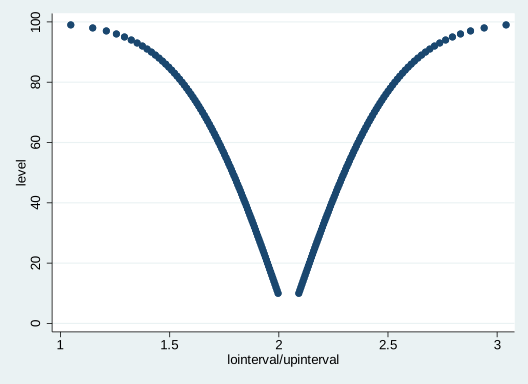
Pretty neat, eh? And below is what our surprisal function looks like, which is simply the -\log_{2}(p) transformation of the observed P-value. For a more comprehensive discussion on surprisals, see this page and check out some of the references at the bottom.
clear
sysuse auto2
postfile topost level pvalue svalue lointerval upinterval using my_new_data, replace
forvalues i = 10/99.9 {
quietly regress price weight, level(`i')
matrix E = r(table)
matrix list E
post topost (`i') (1-`i'/100) ( ln(1-`i'/100)/ln(2) * -1) (E[5,1]) (E[6,1])
}
postclose topost
use my_new_data, clear
twoway (pcscatter svalue lointerval svalue upinterval, mcolor(maroon)), ytitle(Consonance Level (%)) xtitle(Consonance Limits) scale( 0.75) ///
title(Surprisal Curve) subtitle(A function comprised of several consonance intervals at various levels.)
graph export "surprisal.svg", replace
#> no; dataset in memory has changed since last saved
#> r(4);
#>
#>
#>
#> (1978 automobile data)
#>
#>
#> 6. }
#>
#> E[9,2]
#> weight _cons
#> b 2.0440626 -6.7073534
#> se .37683413 1174.4296
#> t 5.4243032 -.00571116
#> pvalue 7.416e-07 .99545897
#> ll 1.9965418 -154.80923
#> ul 2.0915834 141.39452
#> df 72 72
#> crit .12610537 .12610537
#> eform 0 0
#>
#> E[9,2]
#> weight _cons
#> b 2.0440626 -6.7073534
#> se .37683413 1174.4296
#> t 5.4243032 -.00571116
#> pvalue 7.416e-07 .99545897
#> ll 1.9917601 -169.71175
#> ul 2.0963651 156.29704
#> df 72 72
#> crit .13879452 .13879452
#> eform 0 0
#>
#> E[9,2]
#> weight _cons
#> b 2.0440626 -6.7073534
#> se .37683413 1174.4296
#> t 5.4243032 -.00571116
#> pvalue 7.416e-07 .99545897
#> ll 1.9869698 -184.64092
#> ul 2.1011554 171.22621
#> df 72 72
#> crit .15150637 .15150637
#> eform 0 0
#>
#> E[9,2]
#> weight _cons
#> b 2.0440626 -6.7073534
#> se .37683413 1174.4296
#> t 5.4243032 -.00571116
#> pvalue 7.416e-07 .99545897
#> ll 1.9821702 -199.59928
#> ul 2.105955 186.18458
#> df 72 72
#> crit .16424308 .16424308
#> eform 0 0
#>
#> E[9,2]
#> weight _cons
#> b 2.0440626 -6.7073534
#> se .37683413 1174.4296
#> t 5.4243032 -.00571116
#> pvalue 7.416e-07 .99545897
#> ll 1.9773604 -214.58944
#> ul 2.1107648 201.17473
#> df 72 72
#> crit .17700685 .17700685
#> eform 0 0
#>
#> E[9,2]
#> weight _cons
#> b 2.0440626 -6.7073534
#> se .37683413 1174.4296
#> t 5.4243032 -.00571116
#> pvalue 7.416e-07 .99545897
#> ll 1.9725395 -229.61399
#> ul 2.1155857 216.19928
#> df 72 72
#> crit .18979991 .18979991
#> eform 0 0
#>
#> E[9,2]
#> weight _cons
#> b 2.0440626 -6.7073534
#> se .37683413 1174.4296
#> t 5.4243032 -.00571116
#> pvalue 7.416e-07 .99545897
#> ll 1.9677067 -244.67561
#> ul 2.1204184 231.2609
#> df 72 72
#> crit .20262454 .20262454
#> eform 0 0
#>
#> E[9,2]
#> weight _cons
#> b 2.0440626 -6.7073534
#> se .37683413 1174.4296
#> t 5.4243032 -.00571116
#> pvalue 7.416e-07 .99545897
#> ll 1.9628612 -259.77699
#> ul 2.1252639 246.36228
#> df 72 72
#> crit .21548302 .21548302
#> eform 0 0
#>
#> E[9,2]
#> weight _cons
#> b 2.0440626 -6.7073534
#> se .37683413 1174.4296
#> t 5.4243032 -.00571116
#> pvalue 7.416e-07 .99545897
#> ll 1.9580021 -274.92089
#> ul 2.1301231 261.50618
#> df 72 72
#> crit .22837771 .22837771
#> eform 0 0
#>
#> E[9,2]
#> weight _cons
#> b 2.0440626 -6.7073534
#> se .37683413 1174.4296
#> t 5.4243032 -.00571116
#> pvalue 7.416e-07 .99545897
#> ll 1.9531284 -290.11011
#> ul 2.1349968 276.6954
#> df 72 72
#> crit .24131098 .24131098
#> eform 0 0
#>
#> E[9,2]
#> weight _cons
#> b 2.0440626 -6.7073534
#> se .37683413 1174.4296
#> t 5.4243032 -.00571116
#> pvalue 7.416e-07 .99545897
#> ll 1.9482392 -305.34751
#> ul 2.139886 291.9328
#> df 72 72
#> crit .25428528 .25428528
#> eform 0 0
#>
#> E[9,2]
#> weight _cons
#> b 2.0440626 -6.7073534
#> se .37683413 1174.4296
#> t 5.4243032 -.00571116
#> pvalue 7.416e-07 .99545897
#> ll 1.9433337 -320.63601
#> ul 2.1447915 307.2213
#> df 72 72
#> crit .26730308 .26730308
#> eform 0 0
#>
#> E[9,2]
#> weight _cons
#> b 2.0440626 -6.7073534
#> se .37683413 1174.4296
#> t 5.4243032 -.00571116
#> pvalue 7.416e-07 .99545897
#> ll 1.9384108 -335.97858
#> ul 2.1497144 322.56387
#> df 72 72
#> crit .28036693 .28036693
#> eform 0 0
#>
#> E[9,2]
#> weight _cons
#> b 2.0440626 -6.7073534
#> se .37683413 1174.4296
#> t 5.4243032 -.00571116
#> pvalue 7.416e-07 .99545897
#> ll 1.9334695 -351.37828
#> ul 2.1546557 337.96357
#> df 72 72
#> crit .29347943 .29347943
#> eform 0 0
#>
#> E[9,2]
#> weight _cons
#> b 2.0440626 -6.7073534
#> se .37683413 1174.4296
#> t 5.4243032 -.00571116
#> pvalue 7.416e-07 .99545897
#> ll 1.928509 -366.83823
#> ul 2.1596162 353.42352
#> df 72 72
#> crit .30664322 .30664322
#> eform 0 0
#>
#> E[9,2]
#> weight _cons
#> b 2.0440626 -6.7073534
#> se .37683413 1174.4296
#> t 5.4243032 -.00571116
#> pvalue 7.416e-07 .99545897
#> ll 1.923528 -382.36163
#> ul 2.1645971 368.94693
#> df 72 72
#> crit .31986105 .31986105
#> eform 0 0
#>
#> E[9,2]
#> weight _cons
#> b 2.0440626 -6.7073534
#> se .37683413 1174.4296
#> t 5.4243032 -.00571116
#> pvalue 7.416e-07 .99545897
#> ll 1.9185257 -397.95177
#> ul 2.1695995 384.53707
#> df 72 72
#> crit .3331357 .3331357
#> eform 0 0
#>
#> E[9,2]
#> weight _cons
#> b 2.0440626 -6.7073534
#> se .37683413 1174.4296
#> t 5.4243032 -.00571116
#> pvalue 7.416e-07 .99545897
#> ll 1.9135008 -413.61202
#> ul 2.1746243 400.19732
#> df 72 72
#> crit .34647004 .34647004
#> eform 0 0
#>
#> E[9,2]
#> weight _cons
#> b 2.0440626 -6.7073534
#> se .37683413 1174.4296
#> t 5.4243032 -.00571116
#> pvalue 7.416e-07 .99545897
#> ll 1.9084524 -429.34585
#> ul 2.1796728 415.93115
#> df 72 72
#> crit .35986704 .35986704
#> eform 0 0
#>
#> E[9,2]
#> weight _cons
#> b 2.0440626 -6.7073534
#> se .37683413 1174.4296
#> t 5.4243032 -.00571116
#> pvalue 7.416e-07 .99545897
#> ll 1.9033792 -445.15684
#> ul 2.184746 431.74213
#> df 72 72
#> crit .37332973 .37332973
#> eform 0 0
#>
#> E[9,2]
#> weight _cons
#> b 2.0440626 -6.7073534
#> se .37683413 1174.4296
#> t 5.4243032 -.00571116
#> pvalue 7.416e-07 .99545897
#> ll 1.8982801 -461.04865
#> ul 2.1898451 447.63394
#> df 72 72
#> crit .38686124 .38686124
#> eform 0 0
#>
#> E[9,2]
#> weight _cons
#> b 2.0440626 -6.7073534
#> se .37683413 1174.4296
#> t 5.4243032 -.00571116
#> pvalue 7.416e-07 .99545897
#> ll 1.8931538 -477.02508
#> ul 2.1949714 463.61037
#> df 72 72
#> crit .40046481 .40046481
#> eform 0 0
#>
#> E[9,2]
#> weight _cons
#> b 2.0440626 -6.7073534
#> se .37683413 1174.4296
#> t 5.4243032 -.00571116
#> pvalue 7.416e-07 .99545897
#> ll 1.8879991 -493.09005
#> ul 2.2001261 479.67535
#> df 72 72
#> crit .41414377 .41414377
#> eform 0 0
#>
#> E[9,2]
#> weight _cons
#> b 2.0440626 -6.7073534
#> se .37683413 1174.4296
#> t 5.4243032 -.00571116
#> pvalue 7.416e-07 .99545897
#> ll 1.8828147 -509.24762
#> ul 2.2053105 495.83291
#> df 72 72
#> crit .42790157 .42790157
#> eform 0 0
#>
#> E[9,2]
#> weight _cons
#> b 2.0440626 -6.7073534
#> se .37683413 1174.4296
#> t 5.4243032 -.00571116
#> pvalue 7.416e-07 .99545897
#> ll 1.8775992 -525.50196
#> ul 2.210526 512.08725
#> df 72 72
#> crit .44174177 .44174177
#> eform 0 0
#>
#> E[9,2]
#> weight _cons
#> b 2.0440626 -6.7073534
#> se .37683413 1174.4296
#> t 5.4243032 -.00571116
#> pvalue 7.416e-07 .99545897
#> ll 1.8723513 -541.85741
#> ul 2.2157739 528.4427
#> df 72 72
#> crit .45566806 .45566806
#> eform 0 0
#>
#> E[9,2]
#> weight _cons
#> b 2.0440626 -6.7073534
#> se .37683413 1174.4296
#> t 5.4243032 -.00571116
#> pvalue 7.416e-07 .99545897
#> ll 1.8670695 -558.31847
#> ul 2.2210557 544.90376
#> df 72 72
#> crit .46968428 .46968428
#> eform 0 0
#>
#> E[9,2]
#> weight _cons
#> b 2.0440626 -6.7073534
#> se .37683413 1174.4296
#> t 5.4243032 -.00571116
#> pvalue 7.416e-07 .99545897
#> ll 1.8617523 -574.88981
#> ul 2.2263728 561.4751
#> df 72 72
#> crit .4837944 .4837944
#> eform 0 0
#>
#> E[9,2]
#> weight _cons
#> b 2.0440626 -6.7073534
#> se .37683413 1174.4296
#> t 5.4243032 -.00571116
#> pvalue 7.416e-07 .99545897
#> ll 1.8563982 -591.57627
#> ul 2.2317269 578.16156
#> df 72 72
#> crit .49800254 .49800254
#> eform 0 0
#>
#> E[9,2]
#> weight _cons
#> b 2.0440626 -6.7073534
#> se .37683413 1174.4296
#> t 5.4243032 -.00571116
#> pvalue 7.416e-07 .99545897
#> ll 1.8510056 -608.38289
#> ul 2.2371196 594.96819
#> df 72 72
#> crit .51231299 .51231299
#> eform 0 0
#>
#> E[9,2]
#> weight _cons
#> b 2.0440626 -6.7073534
#> se .37683413 1174.4296
#> t 5.4243032 -.00571116
#> pvalue 7.416e-07 .99545897
#> ll 1.8455727 -625.31493
#> ul 2.2425525 611.90022
#> df 72 72
#> crit .52673023 .52673023
#> eform 0 0
#>
#> E[9,2]
#> weight _cons
#> b 2.0440626 -6.7073534
#> se .37683413 1174.4296
#> t 5.4243032 -.00571116
#> pvalue 7.416e-07 .99545897
#> ll 1.8400978 -642.37784
#> ul 2.2480274 628.96313
#> df 72 72
#> crit .54125891 .54125891
#> eform 0 0
#>
#> E[9,2]
#> weight _cons
#> b 2.0440626 -6.7073534
#> se .37683413 1174.4296
#> t 5.4243032 -.00571116
#> pvalue 7.416e-07 .99545897
#> ll 1.834579 -659.57733
#> ul 2.2535461 646.16263
#> df 72 72
#> crit .55590389 .55590389
#> eform 0 0
#>
#> E[9,2]
#> weight _cons
#> b 2.0440626 -6.7073534
#> se .37683413 1174.4296
#> t 5.4243032 -.00571116
#> pvalue 7.416e-07 .99545897
#> ll 1.8290146 -676.91937
#> ul 2.2591106 663.50467
#> df 72 72
#> crit .57067024 .57067024
#> eform 0 0
#>
#> E[9,2]
#> weight _cons
#> b 2.0440626 -6.7073534
#> se .37683413 1174.4296
#> t 5.4243032 -.00571116
#> pvalue 7.416e-07 .99545897
#> ll 1.8234024 -694.41018
#> ul 2.2647228 680.99548
#> df 72 72
#> crit .58556327 .58556327
#> eform 0 0
#>
#> E[9,2]
#> weight _cons
#> b 2.0440626 -6.7073534
#> se .37683413 1174.4296
#> t 5.4243032 -.00571116
#> pvalue 7.416e-07 .99545897
#> ll 1.8177403 -712.05629
#> ul 2.2703848 698.64158
#> df 72 72
#> crit .60058852 .60058852
#> eform 0 0
#>
#> E[9,2]
#> weight _cons
#> b 2.0440626 -6.7073534
#> se .37683413 1174.4296
#> t 5.4243032 -.00571116
#> pvalue 7.416e-07 .99545897
#> ll 1.8120263 -729.86453
#> ul 2.2760989 716.44982
#> df 72 72
#> crit .61575183 .61575183
#> eform 0 0
#>
#> E[9,2]
#> weight _cons
#> b 2.0440626 -6.7073534
#> se .37683413 1174.4296
#> t 5.4243032 -.00571116
#> pvalue 7.416e-07 .99545897
#> ll 1.8062579 -747.84207
#> ul 2.2818673 734.42736
#> df 72 72
#> crit .6310593 .6310593
#> eform 0 0
#>
#> E[9,2]
#> weight _cons
#> b 2.0440626 -6.7073534
#> se .37683413 1174.4296
#> t 5.4243032 -.00571116
#> pvalue 7.416e-07 .99545897
#> ll 1.8004328 -765.99645
#> ul 2.2876924 752.58174
#> df 72 72
#> crit .64651734 .64651734
#> eform 0 0
#>
#> E[9,2]
#> weight _cons
#> b 2.0440626 -6.7073534
#> se .37683413 1174.4296
#> t 5.4243032 -.00571116
#> pvalue 7.416e-07 .99545897
#> ll 1.7945484 -784.3356
#> ul 2.2935768 770.92089
#> df 72 72
#> crit .6621327 .6621327
#> eform 0 0
#>
#> E[9,2]
#> weight _cons
#> b 2.0440626 -6.7073534
#> se .37683413 1174.4296
#> t 5.4243032 -.00571116
#> pvalue 7.416e-07 .99545897
#> ll 1.788602 -802.86785
#> ul 2.2995232 789.45315
#> df 72 72
#> crit .6779125 .6779125
#> eform 0 0
#>
#> E[9,2]
#> weight _cons
#> b 2.0440626 -6.7073534
#> se .37683413 1174.4296
#> t 5.4243032 -.00571116
#> pvalue 7.416e-07 .99545897
#> ll 1.7825909 -821.60203
#> ul 2.3055343 808.18732
#> df 72 72
#> crit .69386422 .69386422
#> eform 0 0
#>
#> E[9,2]
#> weight _cons
#> b 2.0440626 -6.7073534
#> se .37683413 1174.4296
#> t 5.4243032 -.00571116
#> pvalue 7.416e-07 .99545897
#> ll 1.7765119 -840.54741
#> ul 2.3116132 827.1327
#> df 72 72
#> crit .70999578 .70999578
#> eform 0 0
#>
#> E[9,2]
#> weight _cons
#> b 2.0440626 -6.7073534
#> se .37683413 1174.4296
#> t 5.4243032 -.00571116
#> pvalue 7.416e-07 .99545897
#> ll 1.7703621 -859.71383
#> ul 2.3177631 846.29912
#> df 72 72
#> crit .72631555 .72631555
#> eform 0 0
#>
#> E[9,2]
#> weight _cons
#> b 2.0440626 -6.7073534
#> se .37683413 1174.4296
#> t 5.4243032 -.00571116
#> pvalue 7.416e-07 .99545897
#> ll 1.764138 -879.11169
#> ul 2.3239872 865.69698
#> df 72 72
#> crit .74283238 .74283238
#> eform 0 0
#>
#> E[9,2]
#> weight _cons
#> b 2.0440626 -6.7073534
#> se .37683413 1174.4296
#> t 5.4243032 -.00571116
#> pvalue 7.416e-07 .99545897
#> ll 1.7578361 -898.75203
#> ul 2.3302891 885.33733
#> df 72 72
#> crit .75955569 .75955569
#> eform 0 0
#>
#> E[9,2]
#> weight _cons
#> b 2.0440626 -6.7073534
#> se .37683413 1174.4296
#> t 5.4243032 -.00571116
#> pvalue 7.416e-07 .99545897
#> ll 1.7514526 -918.64658
#> ul 2.3366726 905.23187
#> df 72 72
#> crit .77649544 .77649544
#> eform 0 0
#>
#> E[9,2]
#> weight _cons
#> b 2.0440626 -6.7073534
#> se .37683413 1174.4296
#> t 5.4243032 -.00571116
#> pvalue 7.416e-07 .99545897
#> ll 1.7449836 -938.80778
#> ul 2.3431416 925.39308
#> df 72 72
#> crit .79366225 .79366225
#> eform 0 0
#>
#> E[9,2]
#> weight _cons
#> b 2.0440626 -6.7073534
#> se .37683413 1174.4296
#> t 5.4243032 -.00571116
#> pvalue 7.416e-07 .99545897
#> ll 1.7384247 -959.24894
#> ul 2.3497005 945.83423
#> df 72 72
#> crit .81106743 .81106743
#> eform 0 0
#>
#> E[9,2]
#> weight _cons
#> b 2.0440626 -6.7073534
#> se .37683413 1174.4296
#> t 5.4243032 -.00571116
#> pvalue 7.416e-07 .99545897
#> ll 1.7317715 -979.98422
#> ul 2.3563537 966.56951
#> df 72 72
#> crit .82872304 .82872304
#> eform 0 0
#>
#> E[9,2]
#> weight _cons
#> b 2.0440626 -6.7073534
#> se .37683413 1174.4296
#> t 5.4243032 -.00571116
#> pvalue 7.416e-07 .99545897
#> ll 1.725019 -1001.0288
#> ul 2.3631062 987.61406
#> df 72 72
#> crit .846642 .846642
#> eform 0 0
#>
#> E[9,2]
#> weight _cons
#> b 2.0440626 -6.7073534
#> se .37683413 1174.4296
#> t 5.4243032 -.00571116
#> pvalue 7.416e-07 .99545897
#> ll 1.7181621 -1022.3988
#> ul 2.3699631 1008.9841
#> df 72 72
#> crit .8648381 .8648381
#> eform 0 0
#>
#> E[9,2]
#> weight _cons
#> b 2.0440626 -6.7073534
#> se .37683413 1174.4296
#> t 5.4243032 -.00571116
#> pvalue 7.416e-07 .99545897
#> ll 1.7111951 -1044.1118
#> ul 2.37693 1030.6971
#> df 72 72
#> crit .88332619 .88332619
#> eform 0 0
#>
#> E[9,2]
#> weight _cons
#> b 2.0440626 -6.7073534
#> se .37683413 1174.4296
#> t 5.4243032 -.00571116
#> pvalue 7.416e-07 .99545897
#> ll 1.7041122 -1066.1864
#> ul 2.384013 1052.7716
#> df 72 72
#> crit .90212219 .90212219
#> eform 0 0
#>
#> E[9,2]
#> weight _cons
#> b 2.0440626 -6.7073534
#> se .37683413 1174.4296
#> t 5.4243032 -.00571116
#> pvalue 7.416e-07 .99545897
#> ll 1.6969067 -1088.6427
#> ul 2.3912185 1075.228
#> df 72 72
#> crit .92124328 .92124328
#> eform 0 0
#>
#> E[9,2]
#> weight _cons
#> b 2.0440626 -6.7073534
#> se .37683413 1174.4296
#> t 5.4243032 -.00571116
#> pvalue 7.416e-07 .99545897
#> ll 1.6895717 -1111.5027
#> ul 2.3985535 1098.088
#> df 72 72
#> crit .940708 .940708
#> eform 0 0
#>
#> E[9,2]
#> weight _cons
#> b 2.0440626 -6.7073534
#> se .37683413 1174.4296
#> t 5.4243032 -.00571116
#> pvalue 7.416e-07 .99545897
#> ll 1.6820997 -1134.7897
#> ul 2.4060255 1121.375
#> df 72 72
#> crit .9605364 .9605364
#> eform 0 0
#>
#> E[9,2]
#> weight _cons
#> b 2.0440626 -6.7073534
#> se .37683413 1174.4296
#> t 5.4243032 -.00571116
#> pvalue 7.416e-07 .99545897
#> ll 1.6744824 -1158.5295
#> ul 2.4136428 1145.1148
#> df 72 72
#> crit .98075025 .98075025
#> eform 0 0
#>
#> E[9,2]
#> weight _cons
#> b 2.0440626 -6.7073534
#> se .37683413 1174.4296
#> t 5.4243032 -.00571116
#> pvalue 7.416e-07 .99545897
#> ll 1.666711 -1182.7497
#> ul 2.4214142 1169.335
#> df 72 72
#> crit 1.0013732 1.0013732
#> eform 0 0
#>
#> E[9,2]
#> weight _cons
#> b 2.0440626 -6.7073534
#> se .37683413 1174.4296
#> t 5.4243032 -.00571116
#> pvalue 7.416e-07 .99545897
#> ll 1.6587757 -1207.4807
#> ul 2.4293495 1194.066
#> df 72 72
#> crit 1.0224311 1.0224311
#> eform 0 0
#>
#> E[9,2]
#> weight _cons
#> b 2.0440626 -6.7073534
#> se .37683413 1174.4296
#> t 5.4243032 -.00571116
#> pvalue 7.416e-07 .99545897
#> ll 1.6506658 -1232.7556
#> ul 2.4374594 1219.3409
#> df 72 72
#> crit 1.0439521 1.0439521
#> eform 0 0
#>
#> E[9,2]
#> weight _cons
#> b 2.0440626 -6.7073534
#> se .37683413 1174.4296
#> t 5.4243032 -.00571116
#> pvalue 7.416e-07 .99545897
#> ll 1.6423698 -1258.6108
#> ul 2.4457554 1245.1961
#> df 72 72
#> crit 1.0659672 1.0659672
#> eform 0 0
#>
#> E[9,2]
#> weight _cons
#> b 2.0440626 -6.7073534
#> se .37683413 1174.4296
#> t 5.4243032 -.00571116
#> pvalue 7.416e-07 .99545897
#> ll 1.6338747 -1285.0862
#> ul 2.4542505 1271.6715
#> df 72 72
#> crit 1.0885104 1.0885104
#> eform 0 0
#>
#> E[9,2]
#> weight _cons
#> b 2.0440626 -6.7073534
#> se .37683413 1174.4296
#> t 5.4243032 -.00571116
#> pvalue 7.416e-07 .99545897
#> ll 1.6251665 -1312.226
#> ul 2.4629587 1298.8113
#> df 72 72
#> crit 1.1116194 1.1116194
#> eform 0 0
#>
#> E[9,2]
#> weight _cons
#> b 2.0440626 -6.7073534
#> se .37683413 1174.4296
#> t 5.4243032 -.00571116
#> pvalue 7.416e-07 .99545897
#> ll 1.6162293 -1340.0792
#> ul 2.4718958 1326.6645
#> df 72 72
#> crit 1.1353357 1.1353357
#> eform 0 0
#>
#> E[9,2]
#> weight _cons
#> b 2.0440626 -6.7073534
#> se .37683413 1174.4296
#> t 5.4243032 -.00571116
#> pvalue 7.416e-07 .99545897
#> ll 1.6070459 -1368.7001
#> ul 2.4810793 1355.2854
#> df 72 72
#> crit 1.1597058 1.1597058
#> eform 0 0
#>
#> E[9,2]
#> weight _cons
#> b 2.0440626 -6.7073534
#> se .37683413 1174.4296
#> t 5.4243032 -.00571116
#> pvalue 7.416e-07 .99545897
#> ll 1.5975965 -1398.1496
#> ul 2.4905286 1384.7349
#> df 72 72
#> crit 1.1847813 1.1847813
#> eform 0 0
#>
#> E[9,2]
#> weight _cons
#> b 2.0440626 -6.7073534
#> se .37683413 1174.4296
#> t 5.4243032 -.00571116
#> pvalue 7.416e-07 .99545897
#> ll 1.5878595 -1428.4959
#> ul 2.5002657 1415.0812
#> df 72 72
#> crit 1.2106205 1.2106205
#> eform 0 0
#>
#> E[9,2]
#> weight _cons
#> b 2.0440626 -6.7073534
#> se .37683413 1174.4296
#> t 5.4243032 -.00571116
#> pvalue 7.416e-07 .99545897
#> ll 1.5778099 -1459.816
#> ul 2.5103152 1446.4013
#> df 72 72
#> crit 1.2372888 1.2372888
#> eform 0 0
#>
#> E[9,2]
#> weight _cons
#> b 2.0440626 -6.7073534
#> se .37683413 1174.4296
#> t 5.4243032 -.00571116
#> pvalue 7.416e-07 .99545897
#> ll 1.5674199 -1492.1971
#> ul 2.5207052 1478.7823
#> df 72 72
#> crit 1.2648606 1.2648606
#> eform 0 0
#>
#> E[9,2]
#> weight _cons
#> b 2.0440626 -6.7073534
#> se .37683413 1174.4296
#> t 5.4243032 -.00571116
#> pvalue 7.416e-07 .99545897
#> ll 1.5566576 -1525.7387
#> ul 2.5314676 1512.324
#> df 72 72
#> crit 1.2934205 1.2934205
#> eform 0 0
#>
#> E[9,2]
#> weight _cons
#> b 2.0440626 -6.7073534
#> se .37683413 1174.4296
#> t 5.4243032 -.00571116
#> pvalue 7.416e-07 .99545897
#> ll 1.5454862 -1560.5551
#> ul 2.542639 1547.1404
#> df 72 72
#> crit 1.3230659 1.3230659
#> eform 0 0
#>
#> E[9,2]
#> weight _cons
#> b 2.0440626 -6.7073534
#> se .37683413 1174.4296
#> t 5.4243032 -.00571116
#> pvalue 7.416e-07 .99545897
#> ll 1.5338634 -1596.7782
#> ul 2.5542617 1583.3635
#> df 72 72
#> crit 1.3539091 1.3539091
#> eform 0 0
#>
#> E[9,2]
#> weight _cons
#> b 2.0440626 -6.7073534
#> se .37683413 1174.4296
#> t 5.4243032 -.00571116
#> pvalue 7.416e-07 .99545897
#> ll 1.5217399 -1634.562
#> ul 2.5663853 1621.1473
#> df 72 72
#> crit 1.3860811 1.3860811
#> eform 0 0
#>
#> E[9,2]
#> weight _cons
#> b 2.0440626 -6.7073534
#> se .37683413 1174.4296
#> t 5.4243032 -.00571116
#> pvalue 7.416e-07 .99545897
#> ll 1.5090577 -1674.0871
#> ul 2.5790675 1660.6724
#> df 72 72
#> crit 1.4197358 1.4197358
#> eform 0 0
#>
#> E[9,2]
#> weight _cons
#> b 2.0440626 -6.7073534
#> se .37683413 1174.4296
#> t 5.4243032 -.00571116
#> pvalue 7.416e-07 .99545897
#> ll 1.4957479 -1715.5678
#> ul 2.5923772 1702.1531
#> df 72 72
#> crit 1.4550557 1.4550557
#> eform 0 0
#>
#> E[9,2]
#> weight _cons
#> b 2.0440626 -6.7073534
#> se .37683413 1174.4296
#> t 5.4243032 -.00571116
#> pvalue 7.416e-07 .99545897
#> ll 1.4817282 -1759.2614
#> ul 2.606397 1745.8467
#> df 72 72
#> crit 1.4922598 1.4922598
#> eform 0 0
#>
#> E[9,2]
#> weight _cons
#> b 2.0440626 -6.7073534
#> se .37683413 1174.4296
#> t 5.4243032 -.00571116
#> pvalue 7.416e-07 .99545897
#> ll 1.4668982 -1805.4801
#> ul 2.621227 1792.0654
#> df 72 72
#> crit 1.5316139 1.5316139
#> eform 0 0
#>
#> E[9,2]
#> weight _cons
#> b 2.0440626 -6.7073534
#> se .37683413 1174.4296
#> t 5.4243032 -.00571116
#> pvalue 7.416e-07 .99545897
#> ll 1.4511346 -1854.6083
#> ul 2.6369906 1841.1936
#> df 72 72
#> crit 1.5734455 1.5734455
#> eform 0 0
#>
#> E[9,2]
#> weight _cons
#> b 2.0440626 -6.7073534
#> se .37683413 1174.4296
#> t 5.4243032 -.00571116
#> pvalue 7.416e-07 .99545897
#> ll 1.434283 -1907.1275
#> ul 2.6538422 1893.7128
#> df 72 72
#> crit 1.6181644 1.6181644
#> eform 0 0
#>
#> E[9,2]
#> weight _cons
#> b 2.0440626 -6.7073534
#> se .37683413 1174.4296
#> t 5.4243032 -.00571116
#> pvalue 7.416e-07 .99545897
#> ll 1.4161462 -1963.652
#> ul 2.6719789 1950.2373
#> df 72 72
#> crit 1.6662937 1.6662937
#> eform 0 0
#>
#> E[9,2]
#> weight _cons
#> b 2.0440626 -6.7073534
#> se .37683413 1174.4296
#> t 5.4243032 -.00571116
#> pvalue 7.416e-07 .99545897
#> ll 1.3964671 -2024.9835
#> ul 2.6916581 2011.5688
#> df 72 72
#> crit 1.7185161 1.7185161
#> eform 0 0
#>
#> E[9,2]
#> weight _cons
#> b 2.0440626 -6.7073534
#> se .37683413 1174.4296
#> t 5.4243032 -.00571116
#> pvalue 7.416e-07 .99545897
#> ll 1.3749003 -2092.198
#> ul 2.7132249 2078.7833
#> df 72 72
#> crit 1.7757477 1.7757477
#> eform 0 0
#>
#> E[9,2]
#> weight _cons
#> b 2.0440626 -6.7073534
#> se .37683413 1174.4296
#> t 5.4243032 -.00571116
#> pvalue 7.416e-07 .99545897
#> ll 1.3509668 -2166.7882
#> ul 2.7371584 2153.3735
#> df 72 72
#> crit 1.8392595 1.8392595
#> eform 0 0
#>
#> E[9,2]
#> weight _cons
#> b 2.0440626 -6.7073534
#> se .37683413 1174.4296
#> t 5.4243032 -.00571116
#> pvalue 7.416e-07 .99545897
#> ll 1.3239731 -2250.9159
#> ul 2.764152 2237.5012
#> df 72 72
#> crit 1.9108923 1.9108923
#> eform 0 0
#>
#> E[9,2]
#> weight _cons
#> b 2.0440626 -6.7073534
#> se .37683413 1174.4296
#> t 5.4243032 -.00571116
#> pvalue 7.416e-07 .99545897
#> ll 1.2928575 -2347.89
#> ul 2.7952677 2334.4753
#> df 72 72
#> crit 1.9934636 1.9934636
#> eform 0 0
#>
#> E[9,2]
#> weight _cons
#> b 2.0440626 -6.7073534
#> se .37683413 1174.4296
#> t 5.4243032 -.00571116
#> pvalue 7.416e-07 .99545897
#> ll 1.2558669 -2463.1736
#> ul 2.8322583 2449.7589
#> df 72 72
#> crit 2.091625 2.091625
#> eform 0 0
#>
#> E[9,2]
#> weight _cons
#> b 2.0440626 -6.7073534
#> se .37683413 1174.4296
#> t 5.4243032 -.00571116
#> pvalue 7.416e-07 .99545897
#> ll 1.2097716 -2606.8328
#> ul 2.8783536 2593.4181
#> df 72 72
#> crit 2.2139475 2.2139475
#> eform 0 0
#>
#> E[9,2]
#> weight _cons
#> b 2.0440626 -6.7073534
#> se .37683413 1174.4296
#> t 5.4243032 -.00571116
#> pvalue 7.416e-07 .99545897
#> ll 1.1474754 -2800.9832
#> ul 2.9406498 2787.5685
#> df 72 72
#> crit 2.3792621 2.3792621
#> eform 0 0
#>
#> E[9,2]
#> weight _cons
#> b 2.0440626 -6.7073534
#> se .37683413 1174.4296
#> t 5.4243032 -.00571116
#> pvalue 7.416e-07 .99545897
#> ll 1.0470153 -3114.0741
#> ul 3.0411099 3100.6594
#> df 72 72
#> crit 2.6458519 2.6458519
#> eform 0 0
#>
#>
#>
#>
#> file surprisal.svg saved as SVG format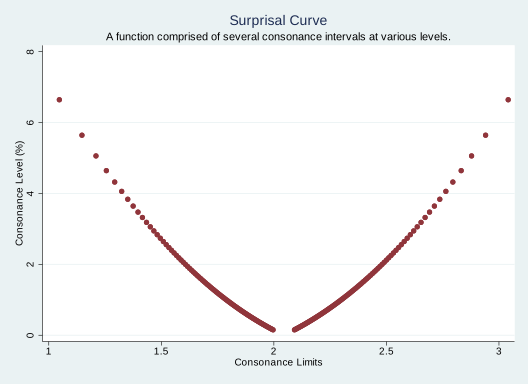
It’s clear that in both plots, we’re missing values of intervals with a confidence/consonance level of less than 10%, but unfortunately, this is the best Stata can do, and what we’ll have to work with. It may not look as pretty as an output from R, but it’s far more useful than blankly staring at a 95% interval and thinking that it is the only piece of information we have regarding compatibility of different effect estimates.
The code that I have pasted above can be used for most commands in Stata that have an option to calculate a consonance level. Thus, if there’s an option for “level”, then the commands above will work to produce a data set of several consonance intervals. Though I am seriously hoping that a Stata expert will see this post and point out how I am wrong.
Now, suppose we wished to fit a generalized linear model, here’s what our code would look like.
clear
sysuse auto2
postfile topost level pvalue svalue lointerval upinterval using my_new_data, replace
forvalues i = 10/99.9 {
quietly glm price mpg, level(`i')
matrix E = r(table)
matrix list E
post topost (`i') (1-`i'/100) ( ln(1-`i'/100)/ln(2) * -1) (E[5,1]) (E[6,1])
}
postclose topost
use my_new_data, clear
list
twoway (pcscatter level lointerval level upinterval),
ytitle(Confidence Level (%)) xtitle(Confidence Limits) ///
title(Consonance Curve)
subtitle(A function comprised of several consonance intervals at various levels.)
#> no; dataset in memory has changed since last saved
#> r(4);
#>
#>
#>
#> (1978 automobile data)
#>
#>
#> 6. }
#>
#> E[9,2]
#> price: price:
#> mpg _cons
#> b -238.89435 11253.061
#> se 53.076687 1170.8128
#> z -4.500928 9.6113239
#> pvalue 6.766e-06 7.162e-22
#> ll -245.56403 11105.935
#> ul -232.22466 11400.187
#> df . .
#> crit .12566135 .12566135
#> eform 0 0
#>
#> E[9,2]
#> price: price:
#> mpg _cons
#> b -238.89435 11253.061
#> se 53.076687 1170.8128
#> z -4.500928 9.6113239
#> pvalue 6.766e-06 7.162e-22
#> ll -246.23507 11091.132
#> ul -231.55362 11414.989
#> df . .
#> crit .13830421 .13830421
#> eform 0 0
#>
#> E[9,2]
#> price: price:
#> mpg _cons
#> b -238.89435 11253.061
#> se 53.076687 1170.8128
#> z -4.500928 9.6113239
#> pvalue 6.766e-06 7.162e-22
#> ll -246.90729 11076.304
#> ul -230.8814 11429.817
#> df . .
#> crit .15096922 .15096922
#> eform 0 0
#>
#> E[9,2]
#> price: price:
#> mpg _cons
#> b -238.89435 11253.061
#> se 53.076687 1170.8128
#> z -4.500928 9.6113239
#> pvalue 6.766e-06 7.162e-22
#> ll -247.5808 11061.447
#> ul -230.2079 11444.674
#> df . .
#> crit .16365849 .16365849
#> eform 0 0
#>
#> E[9,2]
#> price: price:
#> mpg _cons
#> b -238.89435 11253.061
#> se 53.076687 1170.8128
#> z -4.500928 9.6113239
#> pvalue 6.766e-06 7.162e-22
#> ll -248.2557 11046.56
#> ul -229.53299 11459.562
#> df . .
#> crit .17637416 .17637416
#> eform 0 0
#>
#> E[9,2]
#> price: price:
#> mpg _cons
#> b -238.89435 11253.061
#> se 53.076687 1170.8128
#> z -4.500928 9.6113239
#> pvalue 6.766e-06 7.162e-22
#> ll -248.93213 11031.638
#> ul -228.85657 11474.483
#> df . .
#> crit .18911843 .18911843
#> eform 0 0
#>
#> E[9,2]
#> price: price:
#> mpg _cons
#> b -238.89435 11253.061
#> se 53.076687 1170.8128
#> z -4.500928 9.6113239
#> pvalue 6.766e-06 7.162e-22
#> ll -249.61018 11016.681
#> ul -228.17851 11489.44
#> df . .
#> crit .20189348 .20189348
#> eform 0 0
#>
#> E[9,2]
#> price: price:
#> mpg _cons
#> b -238.89435 11253.061
#> se 53.076687 1170.8128
#> z -4.500928 9.6113239
#> pvalue 6.766e-06 7.162e-22
#> ll -250.28999 11001.685
#> ul -227.4987 11504.436
#> df . .
#> crit .21470157 .21470157
#> eform 0 0
#>
#> E[9,2]
#> price: price:
#> mpg _cons
#> b -238.89435 11253.061
#> se 53.076687 1170.8128
#> z -4.500928 9.6113239
#> pvalue 6.766e-06 7.162e-22
#> ll -250.97168 10986.648
#> ul -226.81701 11519.473
#> df . .
#> crit .22754498 .22754498
#> eform 0 0
#>
#> E[9,2]
#> price: price:
#> mpg _cons
#> b -238.89435 11253.061
#> se 53.076687 1170.8128
#> z -4.500928 9.6113239
#> pvalue 6.766e-06 7.162e-22
#> ll -251.65536 10971.567
#> ul -226.13333 11534.555
#> df . .
#> crit .24042603 .24042603
#> eform 0 0
#>
#> E[9,2]
#> price: price:
#> mpg _cons
#> b -238.89435 11253.061
#> se 53.076687 1170.8128
#> z -4.500928 9.6113239
#> pvalue 6.766e-06 7.162e-22
#> ll -252.34117 10956.439
#> ul -225.44752 11549.683
#> df . .
#> crit .2533471 .2533471
#> eform 0 0
#>
#> E[9,2]
#> price: price:
#> mpg _cons
#> b -238.89435 11253.061
#> se 53.076687 1170.8128
#> z -4.500928 9.6113239
#> pvalue 6.766e-06 7.162e-22
#> ll -253.02923 10941.261
#> ul -224.75946 11564.861
#> df . .
#> crit .26631061 .26631061
#> eform 0 0
#>
#> E[9,2]
#> price: price:
#> mpg _cons
#> b -238.89435 11253.061
#> se 53.076687 1170.8128
#> z -4.500928 9.6113239
#> pvalue 6.766e-06 7.162e-22
#> ll -253.71967 10926.03
#> ul -224.06902 11580.091
#> df . .
#> crit .27931903 .27931903
#> eform 0 0
#>
#> E[9,2]
#> price: price:
#> mpg _cons
#> b -238.89435 11253.061
#> se 53.076687 1170.8128
#> z -4.500928 9.6113239
#> pvalue 6.766e-06 7.162e-22
#> ll -254.41264 10910.744
#> ul -223.37605 11595.377
#> df . .
#> crit .2923749 .2923749
#> eform 0 0
#>
#> E[9,2]
#> price: price:
#> mpg _cons
#> b -238.89435 11253.061
#> se 53.076687 1170.8128
#> z -4.500928 9.6113239
#> pvalue 6.766e-06 7.162e-22
#> ll -255.10825 10895.4
#> ul -222.68044 11610.721
#> df . .
#> crit .30548079 .30548079
#> eform 0 0
#>
#> E[9,2]
#> price: price:
#> mpg _cons
#> b -238.89435 11253.061
#> se 53.076687 1170.8128
#> z -4.500928 9.6113239
#> pvalue 6.766e-06 7.162e-22
#> ll -255.80667 10879.994
#> ul -221.98202 11626.128
#> df . .
#> crit .31863936 .31863936
#> eform 0 0
#>
#> E[9,2]
#> price: price:
#> mpg _cons
#> b -238.89435 11253.061
#> se 53.076687 1170.8128
#> z -4.500928 9.6113239
#> pvalue 6.766e-06 7.162e-22
#> ll -256.50802 10864.523
#> ul -221.28067 11641.599
#> df . .
#> crit .33185335 .33185335
#> eform 0 0
#>
#> E[9,2]
#> price: price:
#> mpg _cons
#> b -238.89435 11253.061
#> se 53.076687 1170.8128
#> z -4.500928 9.6113239
#> pvalue 6.766e-06 7.162e-22
#> ll -257.21247 10848.983
#> ul -220.57623 11657.138
#> df . .
#> crit .34512553 .34512553
#> eform 0 0
#>
#> E[9,2]
#> price: price:
#> mpg _cons
#> b -238.89435 11253.061
#> se 53.076687 1170.8128
#> z -4.500928 9.6113239
#> pvalue 6.766e-06 7.162e-22
#> ll -257.92015 10833.373
#> ul -219.86854 11672.749
#> df . .
#> crit .35845879 .35845879
#> eform 0 0
#>
#> E[9,2]
#> price: price:
#> mpg _cons
#> b -238.89435 11253.061
#> se 53.076687 1170.8128
#> z -4.500928 9.6113239
#> pvalue 6.766e-06 7.162e-22
#> ll -258.63123 10817.687
#> ul -219.15746 11688.435
#> df . .
#> crit .37185609 .37185609
#> eform 0 0
#>
#> E[9,2]
#> price: price:
#> mpg _cons
#> b -238.89435 11253.061
#> se 53.076687 1170.8128
#> z -4.500928 9.6113239
#> pvalue 6.766e-06 7.162e-22
#> ll -259.34588 10801.923
#> ul -218.44281 11704.199
#> df . .
#> crit .38532047 .38532047
#> eform 0 0
#>
#> E[9,2]
#> price: price:
#> mpg _cons
#> b -238.89435 11253.061
#> se 53.076687 1170.8128
#> z -4.500928 9.6113239
#> pvalue 6.766e-06 7.162e-22
#> ll -260.06425 10786.076
#> ul -217.72444 11720.045
#> df . .
#> crit .39885507 .39885507
#> eform 0 0
#>
#> E[9,2]
#> price: price:
#> mpg _cons
#> b -238.89435 11253.061
#> se 53.076687 1170.8128
#> z -4.500928 9.6113239
#> pvalue 6.766e-06 7.162e-22
#> ll -260.78652 10770.144
#> ul -217.00217 11735.978
#> df . .
#> crit .41246313 .41246313
#> eform 0 0
#>
#> E[9,2]
#> price: price:
#> mpg _cons
#> b -238.89435 11253.061
#> se 53.076687 1170.8128
#> z -4.500928 9.6113239
#> pvalue 6.766e-06 7.162e-22
#> ll -261.51287 10754.121
#> ul -216.27582 11752
#> df . .
#> crit .42614801 .42614801
#> eform 0 0
#>
#> E[9,2]
#> price: price:
#> mpg _cons
#> b -238.89435 11253.061
#> se 53.076687 1170.8128
#> z -4.500928 9.6113239
#> pvalue 6.766e-06 7.162e-22
#> ll -262.24348 10738.005
#> ul -215.54521 11768.117
#> df . .
#> crit .43991317 .43991317
#> eform 0 0
#>
#> E[9,2]
#> price: price:
#> mpg _cons
#> b -238.89435 11253.061
#> se 53.076687 1170.8128
#> z -4.500928 9.6113239
#> pvalue 6.766e-06 7.162e-22
#> ll -262.97854 10721.79
#> ul -214.81015 11784.331
#> df . .
#> crit .45376219 .45376219
#> eform 0 0
#>
#> E[9,2]
#> price: price:
#> mpg _cons
#> b -238.89435 11253.061
#> se 53.076687 1170.8128
#> z -4.500928 9.6113239
#> pvalue 6.766e-06 7.162e-22
#> ll -263.71825 10705.473
#> ul -214.07044 11800.648
#> df . .
#> crit .4676988 .4676988
#> eform 0 0
#>
#> E[9,2]
#> price: price:
#> mpg _cons
#> b -238.89435 11253.061
#> se 53.076687 1170.8128
#> z -4.500928 9.6113239
#> pvalue 6.766e-06 7.162e-22
#> ll -264.46281 10689.049
#> ul -213.32588 11817.073
#> df . .
#> crit .48172685 .48172685
#> eform 0 0
#>
#> E[9,2]
#> price: price:
#> mpg _cons
#> b -238.89435 11253.061
#> se 53.076687 1170.8128
#> z -4.500928 9.6113239
#> pvalue 6.766e-06 7.162e-22
#> ll -265.21244 10672.513
#> ul -212.57625 11833.609
#> df . .
#> crit .49585035 .49585035
#> eform 0 0
#>
#> E[9,2]
#> price: price:
#> mpg _cons
#> b -238.89435 11253.061
#> se 53.076687 1170.8128
#> z -4.500928 9.6113239
#> pvalue 6.766e-06 7.162e-22
#> ll -265.96735 10655.86
#> ul -211.82134 11850.261
#> df . .
#> crit .51007346 .51007346
#> eform 0 0
#>
#> E[9,2]
#> price: price:
#> mpg _cons
#> b -238.89435 11253.061
#> se 53.076687 1170.8128
#> z -4.500928 9.6113239
#> pvalue 6.766e-06 7.162e-22
#> ll -266.72779 10639.086
#> ul -211.0609 11867.035
#> df . .
#> crit .52440051 .52440051
#> eform 0 0
#>
#> E[9,2]
#> price: price:
#> mpg _cons
#> b -238.89435 11253.061
#> se 53.076687 1170.8128
#> z -4.500928 9.6113239
#> pvalue 6.766e-06 7.162e-22
#> ll -267.49398 10622.185
#> ul -210.29471 11883.937
#> df . .
#> crit .53883603 .53883603
#> eform 0 0
#>
#> E[9,2]
#> price: price:
#> mpg _cons
#> b -238.89435 11253.061
#> se 53.076687 1170.8128
#> z -4.500928 9.6113239
#> pvalue 6.766e-06 7.162e-22
#> ll -268.26617 10605.151
#> ul -209.52252 11900.971
#> df . .
#> crit .55338472 .55338472
#> eform 0 0
#>
#> E[9,2]
#> price: price:
#> mpg _cons
#> b -238.89435 11253.061
#> se 53.076687 1170.8128
#> z -4.500928 9.6113239
#> pvalue 6.766e-06 7.162e-22
#> ll -269.04464 10587.979
#> ul -208.74405 11918.143
#> df . .
#> crit .5680515 .5680515
#> eform 0 0
#>
#> E[9,2]
#> price: price:
#> mpg _cons
#> b -238.89435 11253.061
#> se 53.076687 1170.8128
#> z -4.500928 9.6113239
#> pvalue 6.766e-06 7.162e-22
#> ll -269.82964 10570.662
#> ul -207.95905 11935.459
#> df . .
#> crit .58284151 .58284151
#> eform 0 0
#>
#> E[9,2]
#> price: price:
#> mpg _cons
#> b -238.89435 11253.061
#> se 53.076687 1170.8128
#> z -4.500928 9.6113239
#> pvalue 6.766e-06 7.162e-22
#> ll -270.62147 10553.195
#> ul -207.16722 11952.926
#> df . .
#> crit .59776013 .59776013
#> eform 0 0
#>
#> E[9,2]
#> price: price:
#> mpg _cons
#> b -238.89435 11253.061
#> se 53.076687 1170.8128
#> z -4.500928 9.6113239
#> pvalue 6.766e-06 7.162e-22
#> ll -271.42043 10535.571
#> ul -206.36826 11970.55
#> df . .
#> crit .61281299 .61281299
#> eform 0 0
#>
#> E[9,2]
#> price: price:
#> mpg _cons
#> b -238.89435 11253.061
#> se 53.076687 1170.8128
#> z -4.500928 9.6113239
#> pvalue 6.766e-06 7.162e-22
#> ll -272.22682 10517.783
#> ul -205.56187 11988.338
#> df . .
#> crit .62800601 .62800601
#> eform 0 0
#>
#> E[9,2]
#> price: price:
#> mpg _cons
#> b -238.89435 11253.061
#> se 53.076687 1170.8128
#> z -4.500928 9.6113239
#> pvalue 6.766e-06 7.162e-22
#> ll -273.04099 10499.824
#> ul -204.7477 12006.298
#> df . .
#> crit .64334541 .64334541
#> eform 0 0
#>
#> E[9,2]
#> price: price:
#> mpg _cons
#> b -238.89435 11253.061
#> se 53.076687 1170.8128
#> z -4.500928 9.6113239
#> pvalue 6.766e-06 7.162e-22
#> ll -273.86327 10481.685
#> ul -203.92542 12024.436
#> df . .
#> crit .65883769 .65883769
#> eform 0 0
#>
#> E[9,2]
#> price: price:
#> mpg _cons
#> b -238.89435 11253.061
#> se 53.076687 1170.8128
#> z -4.500928 9.6113239
#> pvalue 6.766e-06 7.162e-22
#> ll -274.69403 10463.359
#> ul -203.09466 12042.762
#> df . .
#> crit .67448975 .67448975
#> eform 0 0
#>
#> E[9,2]
#> price: price:
#> mpg _cons
#> b -238.89435 11253.061
#> se 53.076687 1170.8128
#> z -4.500928 9.6113239
#> pvalue 6.766e-06 7.162e-22
#> ll -275.53365 10444.838
#> ul -202.25504 12061.283
#> df . .
#> crit .69030882 .69030882
#> eform 0 0
#>
#> E[9,2]
#> price: price:
#> mpg _cons
#> b -238.89435 11253.061
#> se 53.076687 1170.8128
#> z -4.500928 9.6113239
#> pvalue 6.766e-06 7.162e-22
#> ll -276.38255 10426.113
#> ul -201.40615 12080.009
#> df . .
#> crit .70630256 .70630256
#> eform 0 0
#>
#> E[9,2]
#> price: price:
#> mpg _cons
#> b -238.89435 11253.061
#> se 53.076687 1170.8128
#> z -4.500928 9.6113239
#> pvalue 6.766e-06 7.162e-22
#> ll -277.24114 10407.173
#> ul -200.54755 12098.948
#> df . .
#> crit .72247905 .72247905
#> eform 0 0
#>
#> E[9,2]
#> price: price:
#> mpg _cons
#> b -238.89435 11253.061
#> se 53.076687 1170.8128
#> z -4.500928 9.6113239
#> pvalue 6.766e-06 7.162e-22
#> ll -278.10989 10388.009
#> ul -199.6788 12118.112
#> df . .
#> crit .73884685 .73884685
#> eform 0 0
#>
#> E[9,2]
#> price: price:
#> mpg _cons
#> b -238.89435 11253.061
#> se 53.076687 1170.8128
#> z -4.500928 9.6113239
#> pvalue 6.766e-06 7.162e-22
#> ll -278.98927 10368.611
#> ul -198.79942 12137.51
#> df . .
#> crit .75541503 .75541503
#> eform 0 0
#>
#> E[9,2]
#> price: price:
#> mpg _cons
#> b -238.89435 11253.061
#> se 53.076687 1170.8128
#> z -4.500928 9.6113239
#> pvalue 6.766e-06 7.162e-22
#> ll -279.8798 10348.967
#> ul -197.90889 12157.154
#> df . .
#> crit .77219321 .77219321
#> eform 0 0
#>
#> E[9,2]
#> price: price:
#> mpg _cons
#> b -238.89435 11253.061
#> se 53.076687 1170.8128
#> z -4.500928 9.6113239
#> pvalue 6.766e-06 7.162e-22
#> ll -280.78202 10329.065
#> ul -197.00667 12177.056
#> df . .
#> crit .78919165 .78919165
#> eform 0 0
#>
#> E[9,2]
#> price: price:
#> mpg _cons
#> b -238.89435 11253.061
#> se 53.076687 1170.8128
#> z -4.500928 9.6113239
#> pvalue 6.766e-06 7.162e-22
#> ll -281.69651 10308.892
#> ul -196.09218 12197.229
#> df . .
#> crit .80642125 .80642125
#> eform 0 0
#>
#> E[9,2]
#> price: price:
#> mpg _cons
#> b -238.89435 11253.061
#> se 53.076687 1170.8128
#> z -4.500928 9.6113239
#> pvalue 6.766e-06 7.162e-22
#> ll -282.62389 10288.435
#> ul -195.1648 12217.686
#> df . .
#> crit .82389363 .82389363
#> eform 0 0
#>
#> E[9,2]
#> price: price:
#> mpg _cons
#> b -238.89435 11253.061
#> se 53.076687 1170.8128
#> z -4.500928 9.6113239
#> pvalue 6.766e-06 7.162e-22
#> ll -283.56481 10267.68
#> ul -194.22388 12238.442
#> df . .
#> crit .84162123 .84162123
#> eform 0 0
#>
#> E[9,2]
#> price: price:
#> mpg _cons
#> b -238.89435 11253.061
#> se 53.076687 1170.8128
#> z -4.500928 9.6113239
#> pvalue 6.766e-06 7.162e-22
#> ll -284.51999 10246.61
#> ul -193.2687 12259.512
#> df . .
#> crit .85961736 .85961736
#> eform 0 0
#>
#> E[9,2]
#> price: price:
#> mpg _cons
#> b -238.89435 11253.061
#> se 53.076687 1170.8128
#> z -4.500928 9.6113239
#> pvalue 6.766e-06 7.162e-22
#> ll -285.49017 10225.208
#> ul -192.29852 12280.913
#> df . .
#> crit .8778963 .8778963
#> eform 0 0
#>
#> E[9,2]
#> price: price:
#> mpg _cons
#> b -238.89435 11253.061
#> se 53.076687 1170.8128
#> z -4.500928 9.6113239
#> pvalue 6.766e-06 7.162e-22
#> ll -286.47618 10203.458
#> ul -191.31251 12302.663
#> df . .
#> crit .89647336 .89647336
#> eform 0 0
#>
#> E[9,2]
#> price: price:
#> mpg _cons
#> b -238.89435 11253.061
#> se 53.076687 1170.8128
#> z -4.500928 9.6113239
#> pvalue 6.766e-06 7.162e-22
#> ll -287.47889 10181.34
#> ul -190.3098 12324.782
#> df . .
#> crit .91536509 .91536509
#> eform 0 0
#>
#> E[9,2]
#> price: price:
#> mpg _cons
#> b -238.89435 11253.061
#> se 53.076687 1170.8128
#> z -4.500928 9.6113239
#> pvalue 6.766e-06 7.162e-22
#> ll -288.49925 10158.832
#> ul -189.28944 12347.29
#> df . .
#> crit .93458929 .93458929
#> eform 0 0
#>
#> E[9,2]
#> price: price:
#> mpg _cons
#> b -238.89435 11253.061
#> se 53.076687 1170.8128
#> z -4.500928 9.6113239
#> pvalue 6.766e-06 7.162e-22
#> ll -289.53828 10135.912
#> ul -188.25041 12370.21
#> df . .
#> crit .95416525 .95416525
#> eform 0 0
#>
#> E[9,2]
#> price: price:
#> mpg _cons
#> b -238.89435 11253.061
#> se 53.076687 1170.8128
#> z -4.500928 9.6113239
#> pvalue 6.766e-06 7.162e-22
#> ll -290.59708 10112.556
#> ul -187.19161 12393.566
#> df . .
#> crit .97411388 .97411388
#> eform 0 0
#>
#> E[9,2]
#> price: price:
#> mpg _cons
#> b -238.89435 11253.061
#> se 53.076687 1170.8128
#> z -4.500928 9.6113239
#> pvalue 6.766e-06 7.162e-22
#> ll -291.67688 10088.737
#> ul -186.11182 12417.385
#> df . .
#> crit .99445788 .99445788
#> eform 0 0
#>
#> E[9,2]
#> price: price:
#> mpg _cons
#> b -238.89435 11253.061
#> se 53.076687 1170.8128
#> z -4.500928 9.6113239
#> pvalue 6.766e-06 7.162e-22
#> ll -292.77897 10064.426
#> ul -185.00972 12441.696
#> df . .
#> crit 1.015222 1.015222
#> eform 0 0
#>
#> E[9,2]
#> price: price:
#> mpg _cons
#> b -238.89435 11253.061
#> se 53.076687 1170.8128
#> z -4.500928 9.6113239
#> pvalue 6.766e-06 7.162e-22
#> ll -293.9048 10039.591
#> ul -183.88389 12466.53
#> df . .
#> crit 1.0364334 1.0364334
#> eform 0 0
#>
#> E[9,2]
#> price: price:
#> mpg _cons
#> b -238.89435 11253.061
#> se 53.076687 1170.8128
#> z -4.500928 9.6113239
#> pvalue 6.766e-06 7.162e-22
#> ll -295.05594 10014.198
#> ul -182.73276 12491.923
#> df . .
#> crit 1.0581216 1.0581216
#> eform 0 0
#>
#> E[9,2]
#> price: price:
#> mpg _cons
#> b -238.89435 11253.061
#> se 53.076687 1170.8128
#> z -4.500928 9.6113239
#> pvalue 6.766e-06 7.162e-22
#> ll -296.23412 9988.209
#> ul -181.55457 12517.912
#> df . .
#> crit 1.0803193 1.0803193
#> eform 0 0
#>
#> E[9,2]
#> price: price:
#> mpg _cons
#> b -238.89435 11253.061
#> se 53.076687 1170.8128
#> z -4.500928 9.6113239
#> pvalue 6.766e-06 7.162e-22
#> ll -297.44125 9961.5809
#> ul -180.34744 12544.54
#> df . .
#> crit 1.1030626 1.1030626
#> eform 0 0
#>
#> E[9,2]
#> price: price:
#> mpg _cons
#> b -238.89435 11253.061
#> se 53.076687 1170.8128
#> z -4.500928 9.6113239
#> pvalue 6.766e-06 7.162e-22
#> ll -298.67946 9934.2675
#> ul -179.10924 12571.854
#> df . .
#> crit 1.1263911 1.1263911
#> eform 0 0
#>
#> E[9,2]
#> price: price:
#> mpg _cons
#> b -238.89435 11253.061
#> se 53.076687 1170.8128
#> z -4.500928 9.6113239
#> pvalue 6.766e-06 7.162e-22
#> ll -299.95108 9906.2169
#> ul -177.83761 12599.904
#> df . .
#> crit 1.1503494 1.1503494
#> eform 0 0
#>
#> E[9,2]
#> price: price:
#> mpg _cons
#> b -238.89435 11253.061
#> se 53.076687 1170.8128
#> z -4.500928 9.6113239
#> pvalue 6.766e-06 7.162e-22
#> ll -301.25875 9877.3711
#> ul -176.52994 12628.75
#> df . .
#> crit 1.1749868 1.1749868
#> eform 0 0
#>
#> E[9,2]
#> price: price:
#> mpg _cons
#> b -238.89435 11253.061
#> se 53.076687 1170.8128
#> z -4.500928 9.6113239
#> pvalue 6.766e-06 7.162e-22
#> ll -302.60542 9847.6652
#> ul -175.18327 12658.456
#> df . .
#> crit 1.2003589 1.2003589
#> eform 0 0
#>
#> E[9,2]
#> price: price:
#> mpg _cons
#> b -238.89435 11253.061
#> se 53.076687 1170.8128
#> z -4.500928 9.6113239
#> pvalue 6.766e-06 7.162e-22
#> ll -303.99439 9817.0259
#> ul -173.7943 12689.095
#> df . .
#> crit 1.2265281 1.2265281
#> eform 0 0
#>
#> E[9,2]
#> price: price:
#> mpg _cons
#> b -238.89435 11253.061
#> se 53.076687 1170.8128
#> z -4.500928 9.6113239
#> pvalue 6.766e-06 7.162e-22
#> ll -305.42945 9785.3702
#> ul -172.35925 12720.751
#> df . .
#> crit 1.2535654 1.2535654
#> eform 0 0
#>
#> E[9,2]
#> price: price:
#> mpg _cons
#> b -238.89435 11253.061
#> se 53.076687 1170.8128
#> z -4.500928 9.6113239
#> pvalue 6.766e-06 7.162e-22
#> ll -306.91486 9752.6037
#> ul -170.87383 12753.518
#> df . .
#> crit 1.2815516 1.2815516
#> eform 0 0
#>
#> E[9,2]
#> price: price:
#> mpg _cons
#> b -238.89435 11253.061
#> se 53.076687 1170.8128
#> z -4.500928 9.6113239
#> pvalue 6.766e-06 7.162e-22
#> ll -308.45554 9718.6179
#> ul -169.33315 12787.503
#> df . .
#> crit 1.3105791 1.3105791
#> eform 0 0
#>
#> E[9,2]
#> price: price:
#> mpg _cons
#> b -238.89435 11253.061
#> se 53.076687 1170.8128
#> z -4.500928 9.6113239
#> pvalue 6.766e-06 7.162e-22
#> ll -310.05718 9683.2876
#> ul -167.73151 12822.834
#> df . .
#> crit 1.340755 1.340755
#> eform 0 0
#>
#> E[9,2]
#> price: price:
#> mpg _cons
#> b -238.89435 11253.061
#> se 53.076687 1170.8128
#> z -4.500928 9.6113239
#> pvalue 6.766e-06 7.162e-22
#> ll -311.72638 9646.4669
#> ul -166.06231 12859.654
#> df . .
#> crit 1.3722038 1.3722038
#> eform 0 0
#>
#> E[9,2]
#> price: price:
#> mpg _cons
#> b -238.89435 11253.061
#> se 53.076687 1170.8128
#> z -4.500928 9.6113239
#> pvalue 6.766e-06 7.162e-22
#> ll -313.47089 9607.9849
#> ul -164.3178 12898.136
#> df . .
#> crit 1.4050716 1.4050716
#> eform 0 0
#>
#> E[9,2]
#> price: price:
#> mpg _cons
#> b -238.89435 11253.061
#> se 53.076687 1170.8128
#> z -4.500928 9.6113239
#> pvalue 6.766e-06 7.162e-22
#> ll -315.29991 9567.6388
#> ul -162.48878 12938.482
#> df . .
#> crit 1.4395315 1.4395315
#> eform 0 0
#>
#> E[9,2]
#> price: price:
#> mpg _cons
#> b -238.89435 11253.061
#> se 53.076687 1170.8128
#> z -4.500928 9.6113239
#> pvalue 6.766e-06 7.162e-22
#> ll -317.22444 9525.1857
#> ul -160.56425 12980.936
#> df . .
#> crit 1.475791 1.475791
#> eform 0 0
#>
#> E[9,2]
#> price: price:
#> mpg _cons
#> b -238.89435 11253.061
#> se 53.076687 1170.8128
#> z -4.500928 9.6113239
#> pvalue 6.766e-06 7.162e-22
#> ll -319.25786 9480.3308
#> ul -158.53083 13025.79
#> df . .
#> crit 1.5141019 1.5141019
#> eform 0 0
#>
#> E[9,2]
#> price: price:
#> mpg _cons
#> b -238.89435 11253.061
#> se 53.076687 1170.8128
#> z -4.500928 9.6113239
#> pvalue 6.766e-06 7.162e-22
#> ll -321.41658 9432.7119
#> ul -156.37211 13073.409
#> df . .
#> crit 1.5547736 1.5547736
#> eform 0 0
#>
#> E[9,2]
#> price: price:
#> mpg _cons
#> b -238.89435 11253.061
#> se 53.076687 1170.8128
#> z -4.500928 9.6113239
#> pvalue 6.766e-06 7.162e-22
#> ll -323.72114 9381.8757
#> ul -154.06755 13124.246
#> df . .
#> crit 1.5981931 1.5981931
#> eform 0 0
#>
#> E[9,2]
#> price: price:
#> mpg _cons
#> b -238.89435 11253.061
#> se 53.076687 1170.8128
#> z -4.500928 9.6113239
#> pvalue 6.766e-06 7.162e-22
#> ll -326.19773 9327.245
#> ul -151.59096 13178.876
#> df . .
#> crit 1.6448536 1.6448536
#> eform 0 0
#>
#> E[9,2]
#> price: price:
#> mpg _cons
#> b -238.89435 11253.061
#> se 53.076687 1170.8128
#> z -4.500928 9.6113239
#> pvalue 6.766e-06 7.162e-22
#> ll -328.88044 9268.0674
#> ul -148.90825 13238.054
#> df . .
#> crit 1.6953977 1.6953977
#> eform 0 0
#>
#> E[9,2]
#> price: price:
#> mpg _cons
#> b -238.89435 11253.061
#> se 53.076687 1170.8128
#> z -4.500928 9.6113239
#> pvalue 6.766e-06 7.162e-22
#> ll -331.81496 9203.3351
#> ul -145.97373 13302.786
#> df . .
#> crit 1.7506861 1.7506861
#> eform 0 0
#>
#> E[9,2]
#> price: price:
#> mpg _cons
#> b -238.89435 11253.061
#> se 53.076687 1170.8128
#> z -4.500928 9.6113239
#> pvalue 6.766e-06 7.162e-22
#> ll -335.06456 9131.6525
#> ul -142.72413 13374.469
#> df . .
#> crit 1.8119107 1.8119107
#> eform 0 0
#>
#> E[9,2]
#> price: price:
#> mpg _cons
#> b -238.89435 11253.061
#> se 53.076687 1170.8128
#> z -4.500928 9.6113239
#> pvalue 6.766e-06 7.162e-22
#> ll -338.72064 9051.0035
#> ul -139.06805 13455.118
#> df . .
#> crit 1.8807936 1.8807936
#> eform 0 0
#>
#> E[9,2]
#> price: price:
#> mpg _cons
#> b -238.89435 11253.061
#> se 53.076687 1170.8128
#> z -4.500928 9.6113239
#> pvalue 6.766e-06 7.162e-22
#> ll -342.92274 8958.3098
#> ul -134.86595 13547.812
#> df . .
#> crit 1.959964 1.959964
#> eform 0 0
#>
#> E[9,2]
#> price: price:
#> mpg _cons
#> b -238.89435 11253.061
#> se 53.076687 1170.8128
#> z -4.500928 9.6113239
#> pvalue 6.766e-06 7.162e-22
#> ll -347.90053 8848.5052
#> ul -129.88816 13657.616
#> df . .
#> crit 2.0537489 2.0537489
#> eform 0 0
#>
#> E[9,2]
#> price: price:
#> mpg _cons
#> b -238.89435 11253.061
#> se 53.076687 1170.8128
#> z -4.500928 9.6113239
#> pvalue 6.766e-06 7.162e-22
#> ll -354.07555 8712.2911
#> ul -123.71314 13793.83
#> df . .
#> crit 2.1700904 2.1700904
#> eform 0 0
#>
#> E[9,2]
#> price: price:
#> mpg _cons
#> b -238.89435 11253.061
#> se 53.076687 1170.8128
#> z -4.500928 9.6113239
#> pvalue 6.766e-06 7.162e-22
#> ll -362.36918 8529.3429
#> ul -115.41951 13976.778
#> df . .
#> crit 2.3263479 2.3263479
#> eform 0 0
#>
#> E[9,2]
#> price: price:
#> mpg _cons
#> b -238.89435 11253.061
#> se 53.076687 1170.8128
#> z -4.500928 9.6113239
#> pvalue 6.766e-06 7.162e-22
#> ll -375.61083 8237.2468
#> ul -102.17786 14268.874
#> df . .
#> crit 2.5758293 2.5758293
#> eform 0 0
#>
#>
#>
#>
#> +---------------------------------------------------+
#> | level pvalue svalue lointer~l upinter~l |
#> |---------------------------------------------------|
#> 1. | 10 .9 .1520031 -245.564 -232.2247 |
#> 2. | 11 .89 .1681228 -246.2351 -231.5536 |
#> 3. | 12 .88 .1844246 -246.9073 -230.8814 |
#> 4. | 13 .87 .2009127 -247.5808 -230.2079 |
#> 5. | 14 .86 .2175914 -248.2557 -229.533 |
#> |---------------------------------------------------|
#> 6. | 15 .85 .2344653 -248.9321 -228.8566 |
#> 7. | 16 .84 .2515388 -249.6102 -228.1785 |
#> 8. | 17 .83 .2688168 -250.29 -227.4987 |
#> 9. | 18 .82 .2863042 -250.9717 -226.817 |
#> 10. | 19 .81 .3040062 -251.6554 -226.1333 |
#> |---------------------------------------------------|
#> 11. | 20 .8 .3219281 -252.3412 -225.4475 |
#> 12. | 21 .79 .3400754 -253.0292 -224.7595 |
#> 13. | 22 .78 .358454 -253.7197 -224.069 |
#> 14. | 23 .77 .3770697 -254.4126 -223.3761 |
#> 15. | 24 .76 .3959287 -255.1083 -222.6804 |
#> |---------------------------------------------------|
#> 16. | 25 .75 .4150375 -255.8067 -221.982 |
#> 17. | 26 .74 .4344028 -256.508 -221.2807 |
#> 18. | 27 .73 .4540316 -257.2125 -220.5762 |
#> 19. | 28 .72 .4739312 -257.9202 -219.8685 |
#> 20. | 29 .71 .4941091 -258.6312 -219.1575 |
#> |---------------------------------------------------|
#> 21. | 30 .7 .5145732 -259.3459 -218.4428 |
#> 22. | 31 .69 .5353317 -260.0642 -217.7244 |
#> 23. | 32 .68 .5563933 -260.7865 -217.0022 |
#> 24. | 33 .67 .577767 -261.5129 -216.2758 |
#> 25. | 34 .66 .5994621 -262.2435 -215.5452 |
#> |---------------------------------------------------|
#> 26. | 35 .65 .6214884 -262.9785 -214.8102 |
#> 27. | 36 .64 .6438562 -263.7183 -214.0704 |
#> 28. | 37 .63 .6665763 -264.4628 -213.3259 |
#> 29. | 38 .62 .6896599 -265.2124 -212.5762 |
#> 30. | 39 .61 .7131189 -265.9673 -211.8213 |
#> |---------------------------------------------------|
#> 31. | 40 .6 .7369656 -266.7278 -211.0609 |
#> 32. | 41 .59 .7612131 -267.494 -210.2947 |
#> 33. | 42 .58 .7858752 -268.2662 -209.5225 |
#> 34. | 43 .57 .8109662 -269.0446 -208.744 |
#> 35. | 44 .56 .8365012 -269.8297 -207.959 |
#> |---------------------------------------------------|
#> 36. | 45 .55 .8624965 -270.6215 -207.1672 |
#> 37. | 46 .54 .8889687 -271.4204 -206.3683 |
#> 38. | 47 .53 .9159358 -272.2268 -205.5619 |
#> 39. | 48 .52 .9434165 -273.041 -204.7477 |
#> 40. | 49 .51 .9714308 -273.8633 -203.9254 |
#> |---------------------------------------------------|
#> 41. | 50 .5 1 -274.694 -203.0947 |
#> 42. | 51 .49 1.029146 -275.5337 -202.255 |
#> 43. | 52 .48 1.058894 -276.3825 -201.4061 |
#> 44. | 53 .47 1.089267 -277.2411 -200.5475 |
#> 45. | 54 .46 1.120294 -278.1099 -199.6788 |
#> |---------------------------------------------------|
#> 46. | 55 .45 1.152003 -278.9893 -198.7994 |
#> 47. | 56 .44 1.184425 -279.8798 -197.9089 |
#> 48. | 57 .43 1.217591 -280.782 -197.0067 |
#> 49. | 58 .42 1.251539 -281.6965 -196.0922 |
#> 50. | 59 .41 1.286304 -282.6239 -195.1648 |
#> |---------------------------------------------------|
#> 51. | 60 .4 1.321928 -283.5648 -194.2239 |
#> 52. | 61 .39 1.358454 -284.52 -193.2687 |
#> 53. | 62 .38 1.395929 -285.4902 -192.2985 |
#> 54. | 63 .37 1.434403 -286.4762 -191.3125 |
#> 55. | 64 .36 1.473931 -287.4789 -190.3098 |
#> |---------------------------------------------------|
#> 56. | 65 .35 1.514573 -288.4992 -189.2894 |
#> 57. | 66 .34 1.556393 -289.5383 -188.2504 |
#> 58. | 67 .33 1.599462 -290.5971 -187.1916 |
#> 59. | 68 .32 1.643856 -291.6769 -186.1118 |
#> 60. | 69 .31 1.68966 -292.779 -185.0097 |
#> |---------------------------------------------------|
#> 61. | 70 .3 1.736966 -293.9048 -183.8839 |
#> 62. | 71 .29 1.785875 -295.0559 -182.7328 |
#> 63. | 72 .28 1.836501 -296.2341 -181.5546 |
#> 64. | 73 .27 1.888969 -297.4413 -180.3474 |
#> 65. | 74 .26 1.943416 -298.6794 -179.1092 |
#> |---------------------------------------------------|
#> 66. | 75 .25 2 -299.9511 -177.8376 |
#> 67. | 76 .24 2.058894 -301.2588 -176.5299 |
#> 68. | 77 .23 2.120294 -302.6054 -175.1833 |
#> 69. | 78 .22 2.184425 -303.9944 -173.7943 |
#> 70. | 79 .21 2.251539 -305.4294 -172.3592 |
#> |---------------------------------------------------|
#> 71. | 80 .2 2.321928 -306.9149 -170.8738 |
#> 72. | 81 .19 2.395929 -308.4555 -169.3331 |
#> 73. | 82 .18 2.473931 -310.0572 -167.7315 |
#> 74. | 83 .17 2.556393 -311.7264 -166.0623 |
#> 75. | 84 .16 2.643856 -313.4709 -164.3178 |
#> |---------------------------------------------------|
#> 76. | 85 .15 2.736966 -315.2999 -162.4888 |
#> 77. | 86 .14 2.836501 -317.2245 -160.5642 |
#> 78. | 87 .13 2.943416 -319.2578 -158.5308 |
#> 79. | 88 .12 3.058894 -321.4166 -156.3721 |
#> 80. | 89 .11 3.184425 -323.7211 -154.0676 |
#> |---------------------------------------------------|
#> 81. | 90 .1 3.321928 -326.1977 -151.591 |
#> 82. | 91 .09 3.473931 -328.8804 -148.9082 |
#> 83. | 92 .08 3.643856 -331.815 -145.9737 |
#> 84. | 93 .07 3.836501 -335.0646 -142.7241 |
#> 85. | 94 .06 4.058894 -338.7206 -139.0681 |
#> |---------------------------------------------------|
#> 86. | 95 .05 4.321928 -342.9227 -134.866 |
#> 87. | 96 .04 4.643856 -347.9005 -129.8882 |
#> 88. | 97 .03 5.058894 -354.0756 -123.7131 |
#> 89. | 98 .02 5.643856 -362.3692 -115.4195 |
#> 90. | 99 .01 6.643856 -375.6108 -102.1779 |
#> +---------------------------------------------------+
#>
#>
#> command ytitle is unrecognized
#> r(199);
#>
#> r(199);We simply replace the first line within the loop with our intended command, just as I’ve replaced
regress price mpg
#> no; dataset in memory has changed since last saved
#> r(4);
#>
#>
#>
#>       Source |       SS           df       MS      Number of obs   =        74
#> -------------+----------------------------------   F(1, 72)        =     20.26
#>        Model |   139449474         1   139449474   Prob > F        =    0.0000
#>     Residual |   495615923        72  6883554.48   R-squared       =    0.2196
#> -------------+----------------------------------   Adj R-squared   =    0.2087
#>        Total |   635065396        73  8699525.97   Root MSE        =    2623.7
#>
#> ------------------------------------------------------------------------------
#>        price | Coefficient  Std. err.      t    P>|t|     [95% conf. interval]
#> -------------+----------------------------------------------------------------
#>          mpg |  -238.8943   53.07669    -4.50   0.000    -344.7008   -133.0879
#>        _cons |   11253.06   1170.813     9.61   0.000     8919.088    13587.03
#> ------------------------------------------------------------------------------
with
glm price mpg
#> no; dataset in memory has changed since last saved
#> r(4);
#>
#>
#>
#> Iteration 0:   log likelihood = -686.53958
#>
#> Generalized linear models                         Number of obs   =         74
#> Optimization     : ML                             Residual df     =         72
#>                                                   Scale parameter =    6883554
#> Deviance         =  495615922.6                   (1/df) Deviance =    6883554
#> Pearson          =  495615922.6                   (1/df) Pearson  =    6883554
#>
#> Variance function: V(u) = 1                       [Gaussian]
#> Link function    : g(u) = u                       [Identity]
#>
#>                                                   AIC             =   18.60918
#> Log likelihood   = -686.5395809                   BIC             =   4.96e+08
#>
#> ------------------------------------------------------------------------------
#>              |                 OIM
#>        price | Coefficient  std. err.      z    P>|z|     [95% conf. interval]
#> -------------+----------------------------------------------------------------
#>          mpg |  -238.8943   53.07669    -4.50   0.000    -342.9227    -134.866
#>        _cons |   11253.06   1170.813     9.61   0.000      8958.31    13547.81
#> ------------------------------------------------------------------------------
If we wanted fit something more complex, like a multilevel mixed model that used restricted maximum likelihood, here’s what our code would look like:
clear
sysuse auto2
postfile topost level pvalue svalue lointerval upinterval using my_new_data, replace

forvalues i = 10/99.9 {
      quietly mixed outcome predictor, reml level(`i')
      matrix E = r(table)
      matrix list E
      post topost (`i') (1-`i'/100) ( ln(1-`i'/100)/ln(2) * -1) (E[5,1]) (E[6,1])
    }

postclose topost
use my_new_data, clear
list

twoway (pcscatter level lointerval level upinterval),
ytitle(Confidence Level (%)) xtitle(Confidence Limits) ///
title(Consonance Curve)
subtitle(A function comprised of several consonance intervals at various levels.)
#> no; dataset in memory has changed since last saved
#> r(4);
#>
#>
#>
#> (1978 automobile data)
#>
#>
#>   6.     }
#> variable outcome not found
#> r(111);
#>
#> r(111);
Basically, our code doesn’t really change that much and with only a few lines of it, we are able to produce graphical tools that can better help us interpret the wide range of effect sizes that are compatible with the model and its assumptions.
It is also important to cite the statistical packages that we have used here, as always.
Cite R Packages
citation("Statamarkdown")
#> To cite package 'Statamarkdown' in publications use:
#>
#>   Hemken D (2025). _Statamarkdown: 'Stata' Markdown_. R package version 0.9.6, commit
#>   dc936d8d6b310a753b7eb32daae9f4d42cf57ae7, <https://github.com/Hemken/Statamarkdown>.
#>
#> A BibTeX entry for LaTeX users is
#>
#>   @Manual{,
#>     title = {Statamarkdown: 'Stata' Markdown},
#>     author = {Doug Hemken},
#>     year = {2025},
#>     note = {R package version 0.9.6, commit dc936d8d6b310a753b7eb32daae9f4d42cf57ae7},
#>     url = {https://github.com/Hemken/Statamarkdown},
#>   }
Session info
#> R version 4.5.2 (2025-10-31)
#> Platform: aarch64-apple-darwin20
#> Running under: macOS Tahoe 26.3
#>
#> Matrix products: default
#> BLAS:   /System/Library/Frameworks/Accelerate.framework/Versions/A/Frameworks/vecLib.framework/Versions/A/libBLAS.dylib
#> LAPACK: /Library/Frameworks/R.framework/Versions/4.5-arm64/Resources/lib/libRlapack.dylib;  LAPACK version 3.12.1
#>
#> locale:
#> [1] C.UTF-8/C.UTF-8/C.UTF-8/C/C.UTF-8/C.UTF-8
#>
#> time zone: America/New_York
#> tzcode source: internal
#>
#> attached base packages:
#>  [1] splines   grid      stats4    parallel  stats     graphics  grDevices utils     datasets  methods   base
#>
#> other attached packages:
#>  [1] cli_3.6.5             texPreview_2.1.0      tinytex_0.58          rmarkdown_2.30        brms_2.23.0
#>  [6] bootImpute_1.3.0      knitr_1.51            boot_1.3-32           gtsummary_2.5.0       reshape2_1.4.5
#> [11] ProfileLikelihood_1.3 ImputeRobust_1.3-1    gamlss_5.5-0          gamlss.dist_6.1-1     gamlss.data_6.0-7
#> [16] mvtnorm_1.3-3         performance_0.15.3    summarytools_1.1.4    tidybayes_3.0.7       htmltools_0.5.9
#> [21] Statamarkdown_0.9.6   car_3.1-3             carData_3.0-5         qqplotr_0.0.7         ggcorrplot_0.1.4.1
#> [26] mitml_0.4-5           pbmcapply_1.5.1       Amelia_1.8.3          Rcpp_1.1.0            blogdown_1.22.2
#> [31] doParallel_1.0.17     iterators_1.0.14      foreach_1.5.2         lattice_0.22-7        bayesplot_1.15.0
#> [36] wesanderson_0.3.7     VIM_6.2.6             colorspace_2.1-2      here_1.0.2            progress_1.2.3
#> [41] loo_2.9.0             mi_1.2                Matrix_1.7-4          broom_1.0.11          yardstick_1.3.2
#> [46] svglite_2.2.2         Cairo_1.7-0           cowplot_1.2.0         mgcv_1.9-4            nlme_3.1-168
#> [51] xfun_0.55             broom.mixed_0.2.9.6   reticulate_1.44.1     kableExtra_1.4.0      posterior_1.6.1
#> [56] checkmate_2.3.3       parallelly_1.46.0     miceFast_0.8.5        randomForest_4.7-1.2  missForest_1.6.1
#> [61] miceadds_3.18-36      quantreg_6.1          SparseM_1.84-2        MCMCpack_1.7-1        MASS_7.3-65
#> [66] coda_0.19-4.1         latex2exp_0.9.6       rstan_2.32.7          StanHeaders_2.32.10   lubridate_1.9.4
#> [71] forcats_1.0.1         stringr_1.6.0         dplyr_1.1.4           purrr_1.2.0           readr_2.1.6
#> [76] tibble_3.3.0          ggplot2_4.0.1         tidyverse_2.0.0       ggtext_0.1.2          concurve_2.7.7
#> [81] showtext_0.9-7        showtextdb_3.0        sysfonts_0.8.9        future.apply_1.20.1   future_1.68.0
#> [86] tidyr_1.3.2           magrittr_2.0.4        mice_3.19.0           rms_8.1-0             Hmisc_5.2-4
#>
#> loaded via a namespace (and not attached):
#>   [1] dichromat_2.0-0.1       nnet_7.3-20             TH.data_1.1-5           vctrs_0.6.5             digest_0.6.39
#>   [6] png_0.1-8               shape_1.4.6.1           proxy_0.4-29            magick_2.9.0            fontLiberation_0.1.0
#>  [11] withr_3.0.2             ggpubr_0.6.2            survival_3.8-3          doRNG_1.8.6.2           emmeans_2.0.1
#>  [16] MatrixModels_0.5-4      systemfonts_1.3.1       ragg_1.5.0              zoo_1.8-15              V8_8.0.1
#>  [21] ggdist_3.3.3            DEoptimR_1.1-4          Formula_1.2-5           prettyunits_1.2.0       rematch2_2.1.2
#>  [26] httr_1.4.7              otel_0.2.0              rstatix_0.7.3           globals_0.18.0          ps_1.9.1
#>  [31] rstudioapi_0.17.1       extremevalues_2.4.1     pan_1.9                 generics_0.1.4          processx_3.8.6
#>  [36] base64enc_0.1-3         curl_7.0.0              mitools_2.4             desc_1.4.3              xtable_1.8-4
#>  [41] svUnit_1.0.8            pracma_2.4.6            evaluate_1.0.5          hms_1.1.4               glmnet_4.1-10
#>  [46] rcartocolor_2.1.2       lmtest_0.9-40           robustbase_0.99-6       matrixStats_1.5.0       svgPanZoom_0.3.4
#>  [51] class_7.3-23            pillar_1.11.1           caTools_1.18.3          compiler_4.5.2          stringi_1.8.7
#>  [56] jomo_2.7-6              minqa_1.2.8             plyr_1.8.9              crayon_1.5.3            abind_1.4-8
#>  [61] metadat_1.4-0           sp_2.2-0                mathjaxr_2.0-0          rapportools_1.2         twosamples_2.0.1
#>  [66] sandwich_3.1-1          whisker_0.4.1           codetools_0.2-20        multcomp_1.4-29         textshaping_1.0.4
#>  [71] bcaboot_0.2-3           openssl_2.3.4           flextable_0.9.10        QuickJSR_1.8.1          e1071_1.7-17
#>  [76] gridtext_0.1.5          lme4_1.1-38             fs_1.6.6                itertools_0.1-3         listenv_0.10.0
#>  [81] Rdpack_2.6.4            pkgbuild_1.4.8          estimability_1.5.1      ggsignif_0.6.4          callr_3.7.6
#>  [86] tzdb_0.5.0              pkgconfig_2.0.3         tools_4.5.2             rbibutils_2.4           viridisLite_0.4.2
#>  [91] DBI_1.2.3               numDeriv_2016.8-1.1     fastmap_1.2.0           scales_1.4.0            officer_0.7.2
#>  [96] opdisDownsampling_1.0.1 insight_1.4.4           rpart_4.1.24            farver_2.1.2            reformulas_0.4.3
#>  [ reached 'max' / getOption("max.print") -- omitted 56 entries ]
Citation
BibTeX citation:
@misc{panda2024,
  author = {Panda, Sir},
  title = {Using {Stata:} {Producing} {Consonance} {Functions}},
  date = {2024-01-01},
  url = {https://lesslikely.com/posts/statistics/stata},
  langid = {en},
  abstract = {A simple guide on how to produce consonance functions in
    Stata.}
}
For attribution, please cite this work as:
1. Panda S. (2024). ‘Using Stata: Producing Consonance
Functions’. Less Likely. https://lesslikely.com/posts/statistics/stata.